

An entity code is a standardized identifier that shows which party or role a loop in an electronic healthcare transaction refers to, such as the submitter (41) or the billing provider (85).
If a payer flags an NPI problem, how does your billing team know whose NPI needs attention? That's the gap behind many frustrating corrections. A biller may check the treating clinician's record even though the rejection identifies the group practice, or change a service-location field when the problem belongs to the subscriber.
For practice managers asking what is an entity code in medical billing, the useful answer goes beyond memorizing abbreviations. The code gives staff a starting point for investigation. It doesn't prove that the accompanying identifier is valid, that the provider is enrolled, or that the service qualifies for payment.
That distinction matters whether your billing team works in the office or remotely. A medical virtual assistant needs to recognize the party named in a response, compare the right records, and know when to escalate rather than make an unsupported change. Reliable rejection work starts with identifying the correct role, then checking the information attached to it.
What an Entity Code Identifies on a Claim
Think of a claim as a shipping box. Its labels distinguish the sender, recipient, and other parties involved. Entity codes are role labels, while the accompanying names and identifiers establish who fills each role.
In an X12 claim, the entity identifier typically appears in NM101, within an NM1 name-and-identification segment. The Mississippi Medicaid institutional claim companion guide specifies 41 for the submitter and 40 for the receiver, alongside the information identifying those parties.
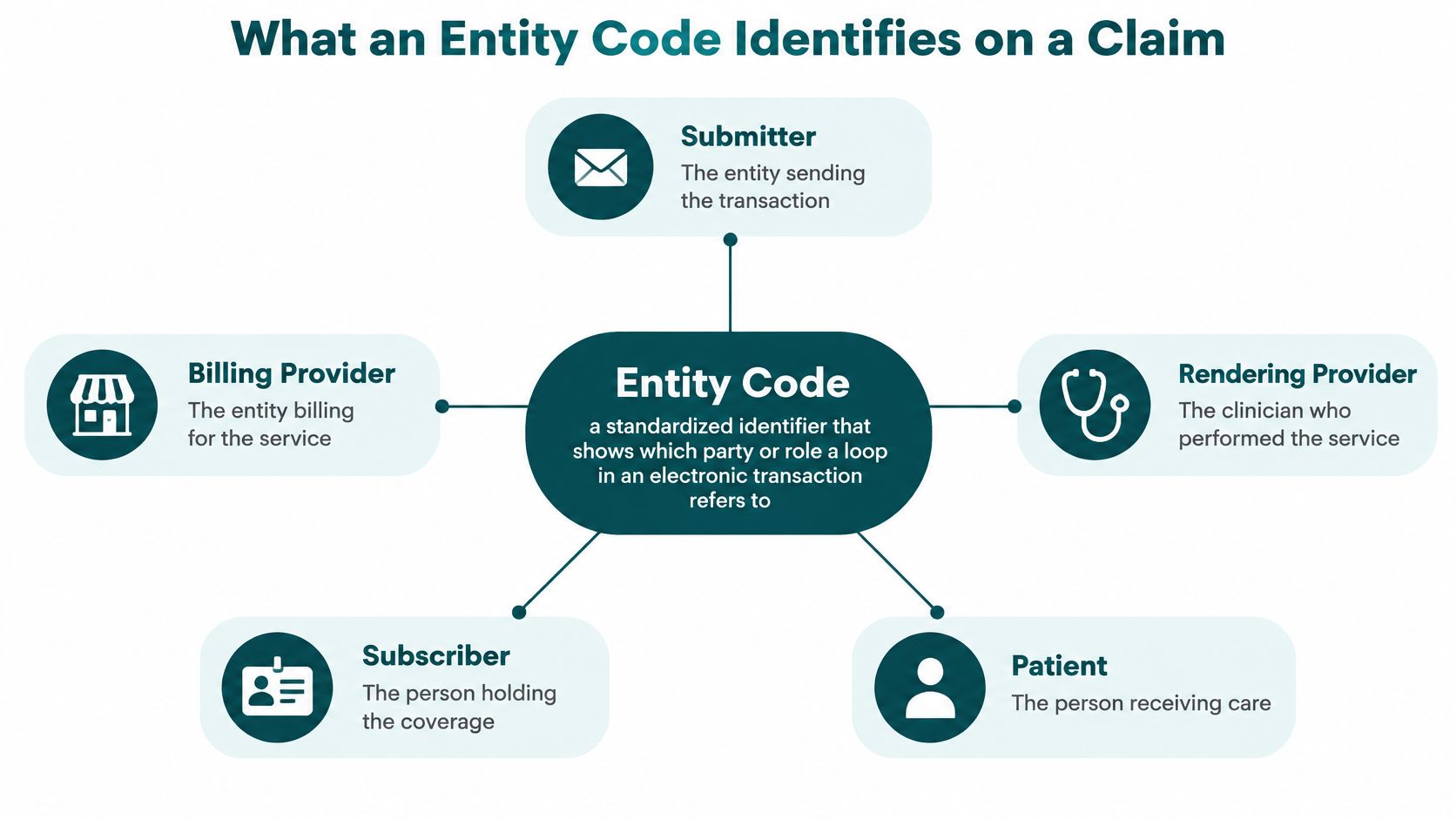
Common entity identifier codes on 837 claims
The following is a working lookup, not a requirement to populate every role on every claim. The applicable transaction guide determines which loops are required and how they're used.
| Entity code | Party or role | Where it appears | Example |
|---|---|---|---|
| 41 | Submitter | Submitter loop (NM1) | Practice or clearinghouse sending the claim |
| 40 | Receiver | Receiver loop (NM1) | Payer or clearinghouse receiving the claim |
| 85 | Billing provider | Billing provider loop | Group practice billing under its tax ID |
| 82 | Rendering provider | Rendering provider loop | Clinician who performed the service |
| 87 | Pay-to provider | Pay-to provider loop | Entity that receives the payment |
| 77 | Service location | Service facility loop | Site where the service was delivered |
| PR | Payer | Payer loop | Insurance company being billed |
| IL | Insured | Subscriber loop | Policyholder named on the coverage |
| QC | Patient | Patient loop | Patient when not the subscriber |
The distinction between submitter and billing provider deserves particular attention. A clearinghouse may transmit a claim without becoming the provider billing for care. Likewise, a remote billing assistant who prepares the submission doesn't become its billing entity.
Reading the name segment
The next element, NM102, distinguishes a person from a non-person organization. CMS X12 implementation documentation illustrates this distinction by specifying NM102 = 2 for a non-person entity.
Illustrative only: NM1*85*2*Riverside Family Clinic*****XX*1234567893
In this sample, 85 labels the billing-provider role, 2 identifies an organization, and the following fields provide its name and identifier. An NM102 value of 1 identifies an individual. This is a teaching example, not a production-ready claim segment or a real practice record.
These labels don't describe a diagnosis, procedure, or place of service, and they don't replace an NPI. When you encounter an unfamiliar code, check the payer's companion guide before changing the role, name, or identifier.
How Entity Codes Differ from NPIs, Taxonomy and Place of Service
| Identifier | Question it answers | Example | Common confusion |
|---|---|---|---|
| Entity code (NM101) | Which role does this party play in the transaction? | 85 for billing provider | Treated as a provider ID |
| NPI | Which specific individual or organization is this? | A clinician's or group's NPI | Used as a role code |
| Taxonomy code | What kind of provider or organization is it? | Family medicine classification | Mistaken for the NPI |
| Place-of-service code | Where was the service performed? | Office setting | Mistaken for the entity role |
| Payer ID | Which payer receives the claim? | Electronic routing identifier | Mistaken for the entity code |
Role versus provider identity
An entity code labels the job a party performs in the transaction. An NPI identifies the specific provider or organization filling that job. Entering a valid clinician NPI in a field intended for the group's billing identity doesn't make the combination correct.
Say a physician sees a patient at a group practice. The group's billing record and the physician's rendering record serve different purposes, even though both relate to the same encounter. The Medicare Claims Processing Manual distinguishes an entity entitled to bill and receive payment from the performing physician whose NPI must be retained.
A solo practice can require a different setup from a group. Don't assume every billing provider must be a group organization, or copy another practice's configuration without checking enrollment.
Classification versus location
Taxonomy describes provider classification and specialization. The National Uniform Claim Committee taxonomy resource describes a 10-character structure covering provider grouping, classification, and specialization. A family medicine classification can be appropriate while the wrong provider occupies the billing role; the reverse can also happen.
Place of service describes the setting. The CMS place-of-service code set defines these codes as identifying the entity or facility location where professional services were rendered. A rejection mentioning an entity therefore isn't, by itself, a reason to change the service setting.
Practical rule: Change the field the rejection actually implicates, then confirm the correction against enrollment and current payer guidance.
Payer IDs add another distinction: they support electronic routing, not provider-role identification. A correct insurance-company name doesn't necessarily establish that the selected electronic destination is right.
For multi-site and telehealth workflows, keep location review separate from provider review. Your assistant should verify where care occurred, which provider performed it, and which enrollment relationship applies, rather than treating those questions as interchangeable.
Where Entity Codes Appear and How to Trace a Rejection
Follow the claim before changing it
Your practice management system builds the electronic claim from registration, encounter, provider, and payer records. Its name-and-identification loops distinguish the submitter, billing provider, rendering provider, subscriber, and patient when applicable. The clearinghouse checks the submission and forwards accepted transactions to the payer.
Different responses describe different stages. A functional acknowledgment addresses transaction processing, a claim acknowledgment addresses claim acceptance or rejection, and an electronic remittance reports payment and adjustments after adjudication. Receipt isn't approval for payment, and a front-end rejection shouldn't automatically be worked as an adjudicated denial.
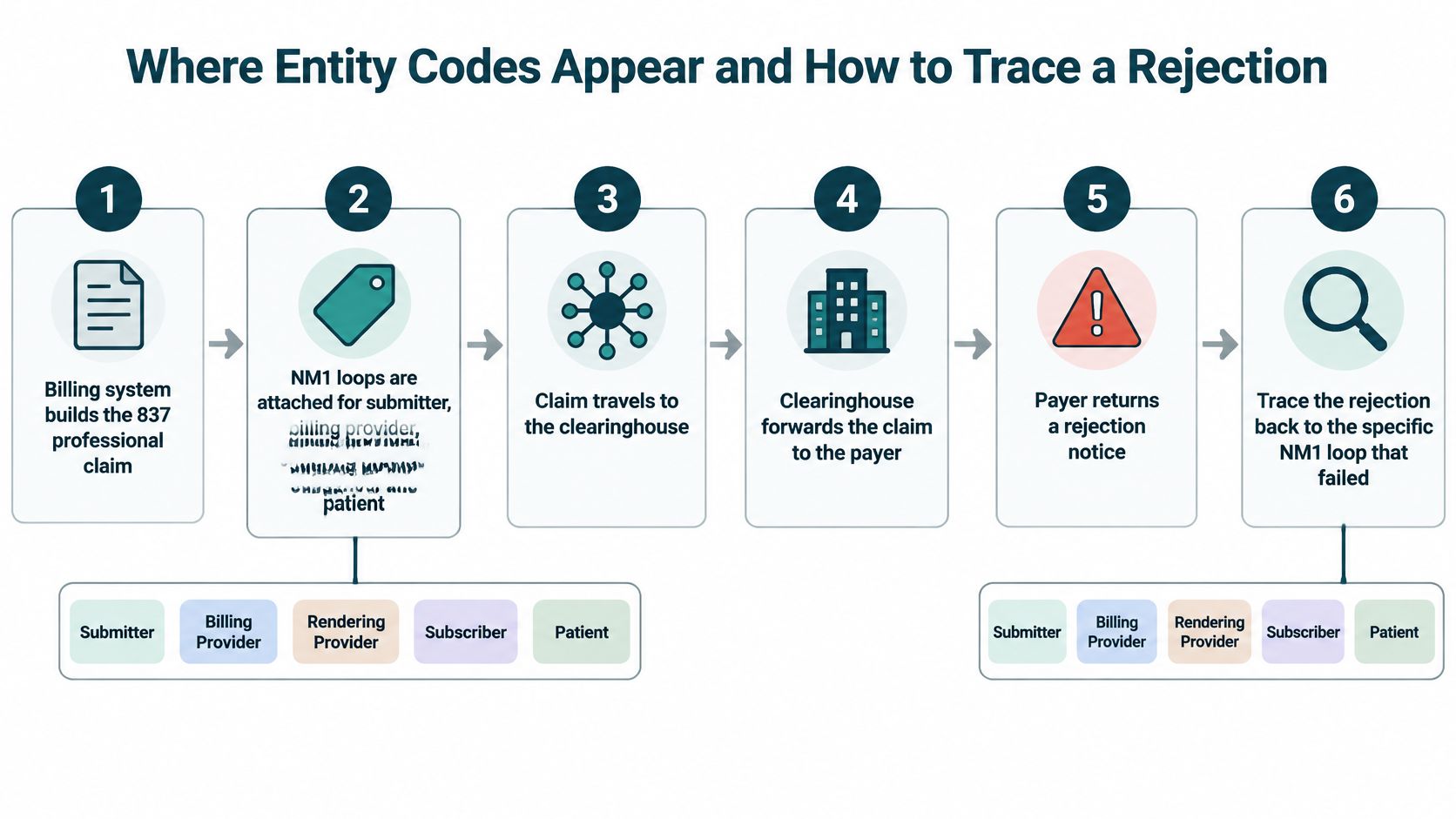
Patient statements generally aren't where you'll find the technical detail needed for this investigation. Open the clearinghouse response, claim-status detail, or relevant remittance information. If the practice management system shows only shortened error text, retrieve the fuller response before deciding what to fix.
Message wording and segment requirements can differ by payer. Keep current companion guides available to remote staff, along with a clear route to clearinghouse or software support when the screen doesn't expose the relevant detail.
A rejection that points to the group, not the clinician
A concrete example shows why the role matters. In Stedi's healthcare claim-status documentation, a 277CA response combining A7, meaning rejected for invalid information, with 562, identifying an entity's NPI issue, and entity 85 points to the billing provider.
Say your group's claim receives that combination. The physician's individual NPI may be perfectly accurate. Replacing it or editing the clinician's taxonomy would target the wrong record if the response identifies the group's billing identity.
The entity code also doesn't prove that its own value is wrong. It may correctly identify the billing provider while the accompanying NPI, payer enrollment, or relationship between records needs attention.
The entity code tells you whose information to investigate. It doesn't tell you that changing the role code is the solution.
A repeatable rejection routine
Capture the complete response. Copy the category, status, and entity identifier, not just the readable error message. Save the claim reference in the approved work queue so another biller can reproduce the investigation.
Identify the claim role and its corresponding loop. A billing-provider message sends you to the billing record; a rendering-provider message sends you to the treating clinician's record. Don't begin with whichever provider screen is easiest to open.
Compare the enrollment record with the transmitted claim. Review the relevant NPI, tax ID, taxonomy, name, and address. Confirm what the system sent, not merely what its provider-maintenance screen currently displays.
Determine whether the error belongs to this claim or to shared master data. An isolated encounter selection needs a different correction from a provider profile that supplies incorrect information to every subsequent submission.
Correct the source through the approved process. If master data is wrong, obtain the authorized update before regenerating the claim. Avoid manually patching the outbound transaction while leaving the underlying record unchanged.
Check the companion guide before changing an unrelated field. A location-related message may require reviewing place of service, but an NPI message doesn't justify changing it without supporting evidence.
Resubmit and verify the response. Log the rejected entity, confirmed cause, correction, and outcome. Closing a task after pressing submit leaves the practice without evidence that the correction worked.
For broader follow-up, Clarity's resource on how to turn payer rejections into prevention can help frame the move from individual fixes to recurring-error review. Keep that review connected to your practice's common medical billing denials, while preserving the distinction between rejected submissions and adjudicated claims.
Rejection clues, the entity to check and the first check
| Rejection clue | Entity to check | First check |
|---|---|---|
| Invalid NPI tied to entity 85 | Billing provider | Group NPI, tax ID, and payer enrollment |
| Invalid NPI tied to entity 82 | Rendering provider | Clinician NPI, taxonomy, and enrollment |
| Address or location mismatch | Service location (77), when identified | Facility address and applicable place of service |
| Payer name or ID rejected | Payer (PR) | Payer ID from the current companion guide |
| Missing required name or ID | Entity named in the message | Completeness of that entity's loop |
Treat these as starting checks, not automatic corrections. An address message can concern a billing address rather than the service facility, so the named entity and loop remain essential.
Keeping Entity Records Accurate on a Remote Billing Team
Adding more identifiers doesn't repair an inconsistent provider record. A stale secondary identifier can introduce another mismatch. Recurring entity rejections should prompt a master-data review, not just another round of claim edits.
CMS claim-edit documentation illustrates that required information is enforced at particular claim segments. That's why a field can appear complete on screen while the transmitted claim still lacks the required information.
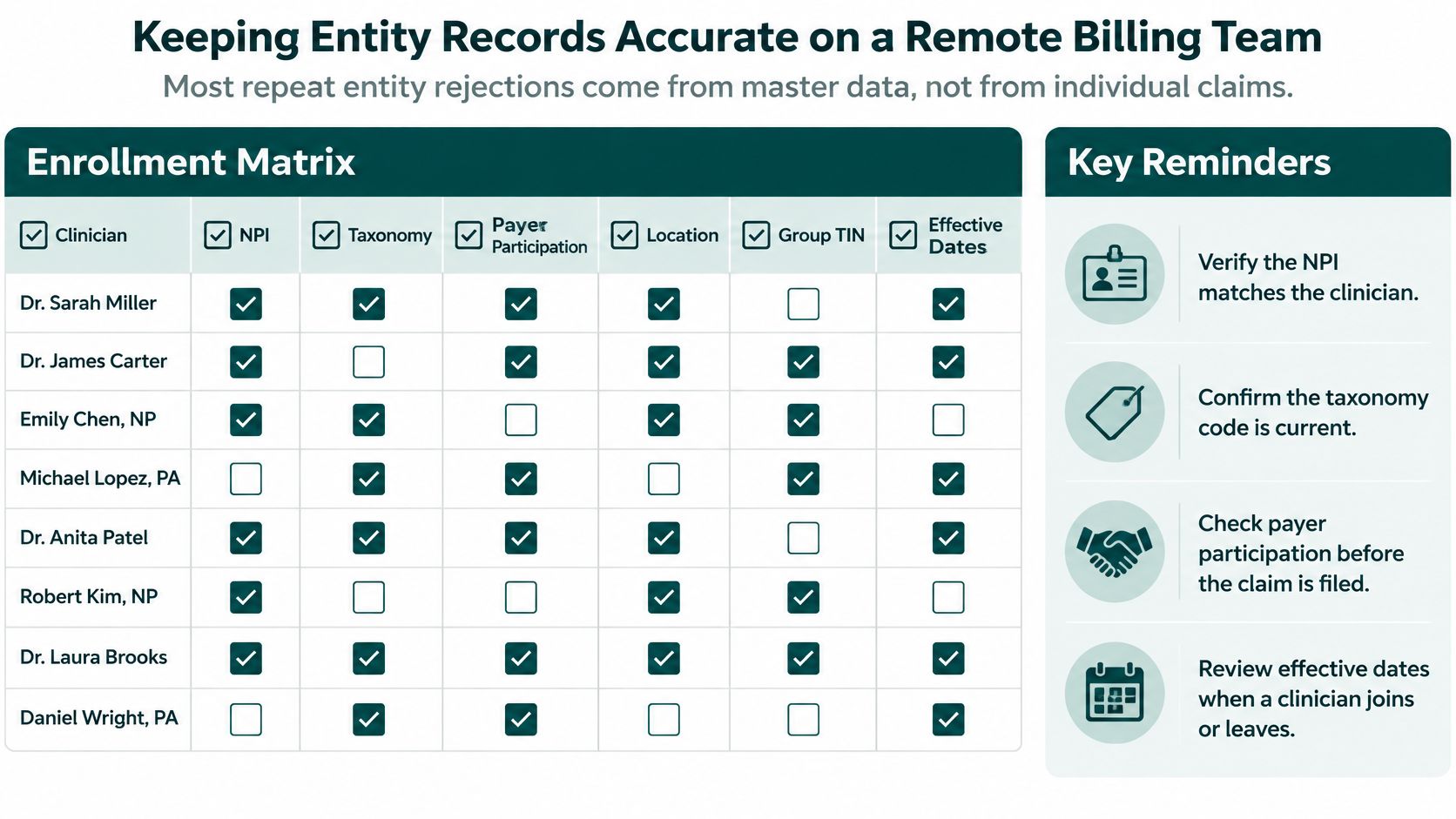
Give master data a named owner
Maintain an enrollment matrix linking each clinician's NPI, taxonomy, payer participation, locations, group tax ID, reassignment status, and effective dates. Compare it with claim-scrubber findings and clearinghouse responses. Clinician onboarding, address changes, mergers, new locations, and payer contract changes should trigger review.
Assign an owner who approves shared-record changes. A remote assistant can identify a discrepancy and prepare supporting evidence without independently editing the provider profile. That approval step can slow urgent work, so establish a same-day escalation route and backup approver.
Connect this review to charge-entry controls in medical billing, where staff select the provider and location that will feed the claim.
An assignable governance checklist
- Enrollment owner: Maintain verified records and effective dates.
- Billing assistant: Compare rejected claims with the matrix and flag discrepancies.
- Authorized approver: Review source evidence before changing shared data.
- Billing lead: Confirm that regenerated claims contain the approved correction.
- Practice manager: Review recurring errors and unresolved escalations.
At MedicalVirtual, clients grant EMR access under their own credentialing and access-control policies, just as they would for in-office staff. We aren't automatically a HIPAA covered entity because we provide administrative staffing; when we act as a business associate handling PHI for a covered entity, the applicable BAA and HIPAA requirements govern that handling.
How Remote Billing Access Affects HIPAA Obligations
Remote billing work requires more than a portal password. Define the assistant's responsibilities, approved systems, access permissions, and escalation limits before allowing access to patient information. Remove access when the assignment ends, including payer portals that may sit outside the practice's usual employee-offboarding process.
Our dedicated specialists work inside the client's practice management system and payer portals. MedicalVirtual signs a BAA with each client practice, and we organize work around approved systems rather than local PHI storage.
Separate legal obligations from operating safeguards
HIPAA business-associate obligations depend on the functions performed and the relationship with the covered entity, not the label “staffing provider.” Where a business-associate arrangement applies, the required agreement and safeguards must address the handling of PHI. Confirm the arrangement with your compliance professional, especially when personnel access systems from another country.
Use the following as recommended operating controls, not as a claim that HIPAA supplies this exact checklist:
- Individual access: Assign unique accounts rather than shared staff credentials.
- Limited permissions: Match access to the assistant's approved responsibilities.
- Stronger authentication: Enable multifactor authentication where available.
- Access reviews: Check permissions periodically and after role changes.
- Clear escalation: Route questionable disclosures and unusual requests to the designated practice contact.
For a broader operational review, you can browse HIPAA requirements for clinics from CloudOrbis Inc. Use such checklists as planning aids, not substitutes for a practice-specific assessment.
Evaluate evidence, not certification language
HHS doesn't recognize an official HIPAA certification. Review training records, written policies, access procedures, and contractual responsibilities instead of relying on a certification claim. Your healthcare regulatory compliance procedures should also explain how staff report suspected incidents.
A signed agreement doesn't replace controlled access, supervision, or a working offboarding process.
Remote administrative staff shouldn't make clinical judgments or perform licensed work outside an expressly permitted role. Requirements vary by arrangement and jurisdiction, so confirm obligations with qualified counsel or a compliance professional.
The Takeaway
An entity code in medical billing is a role label, not a substitute for provider identity, specialty classification, or service location. Its practical value is directing your billing team to the right party before anyone changes a field. A rejection naming an entity may indicate incorrect information attached to that role, not an incorrect role code.
Start with a manageable review of recent rejections. Record the entity named in each response, compare the relevant claim information with your enrollment matrix, and assign responsibility for unresolved discrepancies. Confirm current payer guidance and establish an approval path for shared-record changes so an urgent correction doesn't create a new problem elsewhere.
You can run this review with your existing team; outside help isn't necessary to establish the process. If billing capacity is the constraint, a staffing partner such as MedicalVirtual can provide pre-vetted support, while your practice retains control over access, approvals, and escalation decisions.
MedicalVirtual offers virtual medical billing assistants for charge entry, claim submission, denial follow-up, payer calls, and patient statements. Visit MedicalVirtual to discuss support for your rejection queue, including role-specific checks and escalation within your practice's approved workflow.