

A prior authorization request takes an average of 13 hours of administrative work per week per provider, according to CMS's overview of electronic prior authorization. That workload is a reminder that a prior authorization form isn't just a document to fill out. It starts a process that needs complete clinical evidence, careful submission, active follow-up, and a named person responsible for the next step.
A prior authorization form is the request a health plan uses to decide whether a service, procedure, or medication is covered before it's delivered. It typically asks for patient and insurance details, the ordering provider, the requested item, a diagnosis, and records that support the request. The exact fields and supporting documents vary by payer and product, so a form that worked for one plan may be incomplete for another.
For practice managers, the practical challenge is to make each request accurate, trackable, and easy to hand off. The sections below explain what to enter, which records to attach, how to submit and track a request, what to do when a payer asks for more information, and how to assign work safely to in-house or remote staff.
What a Prior Authorization Form Asks and Why It Matters
A prior authorization form gathers the information a payer needs to review a proposed service or medication against its coverage requirements. The form usually identifies the patient and insurance plan, the ordering provider, the requested service or drug, the diagnosis, and the clinical evidence supporting medical necessity. Some payers use a paper form, while others present a payer-specific questionnaire through a portal or an electronic health record workflow.
The form is only one part of the process. Staff still need to check eligibility and authorization requirements, assemble the right records, submit the request through the correct channel, monitor its status, answer questions, and manage denials or appeals. If the request is missing a required code, signature, or clinical note, the payer may pend or return it instead of making a decision.
That distinction matters in day-to-day operations. A stalled imaging request can affect appointment planning; an unresolved procedure authorization can leave a schedule slot unusable; a delayed medication request can interrupt a treatment plan. The precise consequences depend on the request, the payer, and the patient's clinical situation, but the workflow needs to make delays visible rather than leaving a submitted form unowned.
Workload and access
The administrative load is substantial. CMS estimated that prior authorization requests cost providers $20 to $50 per hour and required an average of 13 hours per week, equivalent to approximately $34,000 and 700 hours of administrative time per provider annually, according to its electronic prior authorization overview.
The form also sits at the intersection of several decisions that change what staff must collect and how they track the case:
- Urgency: An expedited request needs a documented urgency classification, not a preference for a faster answer.
- Request type: An initial request, extension, modification, and appeal can require different information.
- Service or drug: Medical services and pharmacy-benefit requests may use different forms, submission routes, and decision processes.
A useful request is one a reviewer can understand without calling the office to locate basic facts. That means the form, supporting records, and submission log need to agree. By the end of the workflow, staff should be able to identify what was requested, what evidence was sent, when it was submitted, and who owns the next action.
Prior Authorization Form Fields, Section by Section
A usable prior authorization form works as a structured clinical-data workflow. The HL7 Da Vinci Prior Authorization Support framework describes interoperable functions for identifying coverage requirements, collecting payer-specific documentation, and packaging a request for transmission. Electronic or paper, the form works when each answer is discrete, complete, and traceable to a source record.
Payer templates vary by line of business and change without much notice. Keep the current version of each form your practice uses, and check the payer's portal or provider manual before filling a field. A form saved last quarter can carry a different field set or an updated payer instruction.
Use the table as a field-by-field check. The gap column names the error that most often turns into a pend.
| Form Section | Field | What to Enter | Common Gap |
|---|---|---|---|
| Patient and coverage | Member ID and group number | Exactly as shown on the current card, with payer name | Outdated plan after a coverage change |
| Patient and coverage | Patient name and date of birth | Match the payer's enrollment record | Name spelled differently from the insurance card |
| Provider | Ordering provider and NPI | Clinician who signed the order, with the correct NPI | Ordering and rendering roles swapped |
| Provider | Servicing facility or site of service | Where the service will be performed | Office setting entered for a hospital outpatient service |
| Requested service | CPT or HCPCS code, or drug name with NDC | Codes copied from the signed order | Codes that don't match the order |
| Requested service | Quantity, frequency, and duration | Units, sessions, or dosing period | Left blank for a therapy or infusion series |
| Diagnosis | Primary and secondary ICD-10-CM codes | Codes that support medical necessity | Symptom code used where a confirmed diagnosis is documented |
| Clinical history | Prior treatments and outcomes | Each therapy with start date, duration, and result | Narrative with no dates |
| Clinical findings | Examination findings and test results | Values and dates, tied to the source document | Results referenced but not attached |
| Request details | Initial, extension, modification, or appeal | Type that matches the case, with urgency marked | Expedited case marked as standard |
| Dates | Requested start date and date of service | A date inside the payer's validity window | Start date that passes before the decision |
| Attestation | Ordering clinician signature or approval | Signed or approved as the payer requires | Unsigned form sent as final |
Member ID, group number, and patient name fail when staff copy from an old card or a scanned image with a transposed digit. Check them against the eligibility response, not just the card. Provider fields fail when the ordering clinician and rendering clinician are swapped, or when the NPI belongs to a covering provider who never signed the order. The authorization specialist can catch the mismatch, but only the ordering clinician's office can correct the order.
Clinical fields need dates. “Failed conservative care” means little unless the form states which therapy, how long, and what happened. If a test result is cited, put the collection date beside it and make sure the report can be located by the person assembling the packet. The form and the packet should tell the same story.
Request details and dates cause avoidable pends. Mark expedited only when the documentation supports the payer's urgency definition; a standard request sent as expedited can be reclassified and lose time. Check that the requested start date falls inside the payer's window and that an approval will still be active when the service is scheduled.
Before submission, assign a named owner to every open field: eligibility specialist for a coverage mismatch, the ordering provider's office for a signature, the authorization specialist for a code discrepancy. The form is complete when someone can state which reviewer should approve it, which document supports each clinical answer, and who owns the next step if the payer pends the case.
The same approval discipline shows up outside health care: templates for project change requests separate required fields, approvals and supporting documents. In prior authorization, that means keeping the payer's current form, recording who approved the clinical content, and preserving the exact version submitted.
Supporting Clinical Documents by Request Type
The form summarizes the request; the attached records support it. A reviewer needs enough relevant evidence to understand why the requested service or medication is being considered and how the patient's history relates to the payer's criteria. A long chart dump isn't a substitute for a focused packet.
Match records to the request
| Request | Records commonly needed |
|---|---|
| Imaging | Recent visit note with symptoms and duration, relevant conservative treatment and outcomes, and supporting examination findings |
| Surgery or procedure | Consultation note, operative plan, relevant imaging or test results, and documentation of alternatives tried or considered inappropriate |
| Specialty medication | Diagnosis, prior therapies and outcomes, relevant lab results, and the prescribing clinician's note |
| Durable equipment or therapy | Treatment plan, functional assessment, and progress notes |
| Extension | Progress notes that describe the response to treatment and why continued care is requested |
| Appeal | Denial letter, original submission, additional relevant chart notes, and a letter of medical necessity from the ordering provider |
Use the payer's current criteria to decide what belongs in the packet. Label each attachment with its date and author, and make sure the form's references match the actual documents. Sending the entire chart when only a particular note or test is requested can make a focused review harder. Follow the minimum necessary approach for protected health information, and provide additional records when the payer specifically requests them.
Some plans use electronic clinical questionnaires in place of, or alongside, attachments. Those questions can still require the same source documentation, even when staff enter answers directly into a portal. Because requirements can change by payer and request, check the current instructions rather than relying on a packet assembled for a previous case.
Administrative staff can gather, label, and check records, but clinical content should come from the ordering clinician. For medication requests, a pharmacy prior authorization workflow can help practices keep payer-specific forms, prescribing documentation, and follow-up organized without shifting clinical decisions to administrative staff.
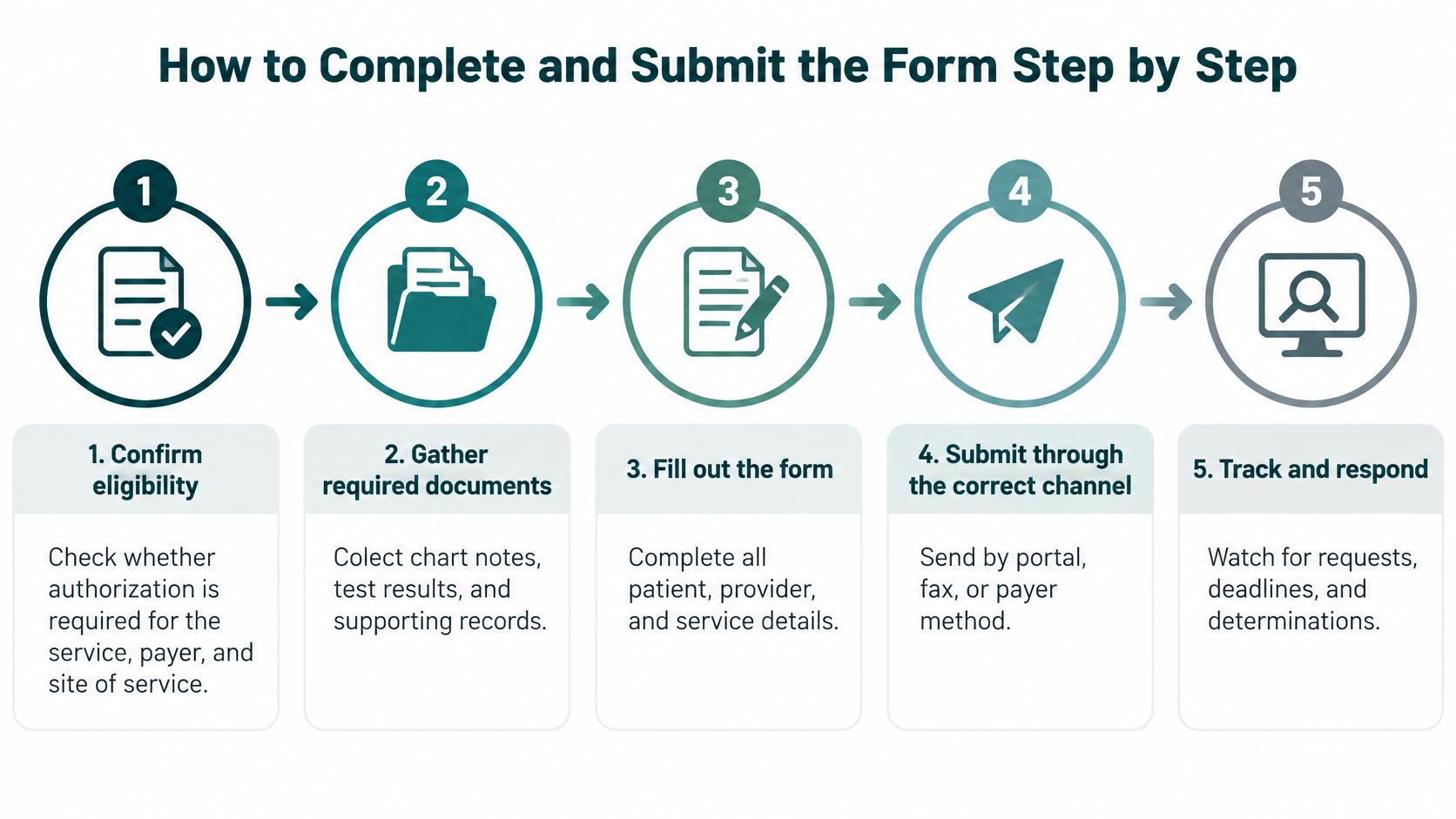
How to Complete and Submit the Form Step by Step
A complete submission has a matching form, the required labeled records, a submission reference, and a follow-up date. This five-step sequence keeps the administrative work tied to the payer's rules and the signed order.
Confirm eligibility and whether authorization is required. Check the patient's current plan and the requirement for the specific service, payer, and site of service. Skipping this check can waste time preparing a packet for the wrong plan or sending a request the payer doesn't require.
Get the current payer form or questionnaire. Use the payer's current template or portal workflow. An older form may omit required questions or use outdated submission instructions, so don't reuse a saved copy without confirming it's still accepted.
Gather the order and supporting records. Pull the requested service or medication, codes, quantity, and dates from the signed order. Collect the clinical documents the payer asks for, and record the source for each answer rather than reconstructing details from memory.
Complete and reconcile the fields. Match patient and provider identifiers to payer records, answer every required question using dated chart evidence, and mark the request type and urgency according to the ordering clinician's direction and the payer's definitions. Before submission, verify that every attachment referenced in the form is included and legible.
Submit through the payer's specified channel and log it. Use the portal, fax number, or other route designated by the payer. Send protected health information only through an approved secure channel. Record the submission date, channel, confirmation or reference number, and next follow-up date.
Make urgency a clinical decision
Staff can flag a request for expedited handling when the ordering clinician identifies an urgent clinical need and the payer's criteria support that classification. Administrative staff shouldn't independently make a clinical judgment or mark every request expedited to try to move it faster. Route questions about the patient's condition or rationale to the clinician who placed the order.
Submission check: Keep a copy of the exact form and attachments sent, along with the confirmation number. That record makes it possible to answer a payer's question using the same information the payer received.
A submission isn't complete operationally until someone owns the next check. Put the follow-up date on the calendar while logging the request, rather than leaving it in an inbox for someone to remember later.
Standard, Expedited and Drug Request Timelines
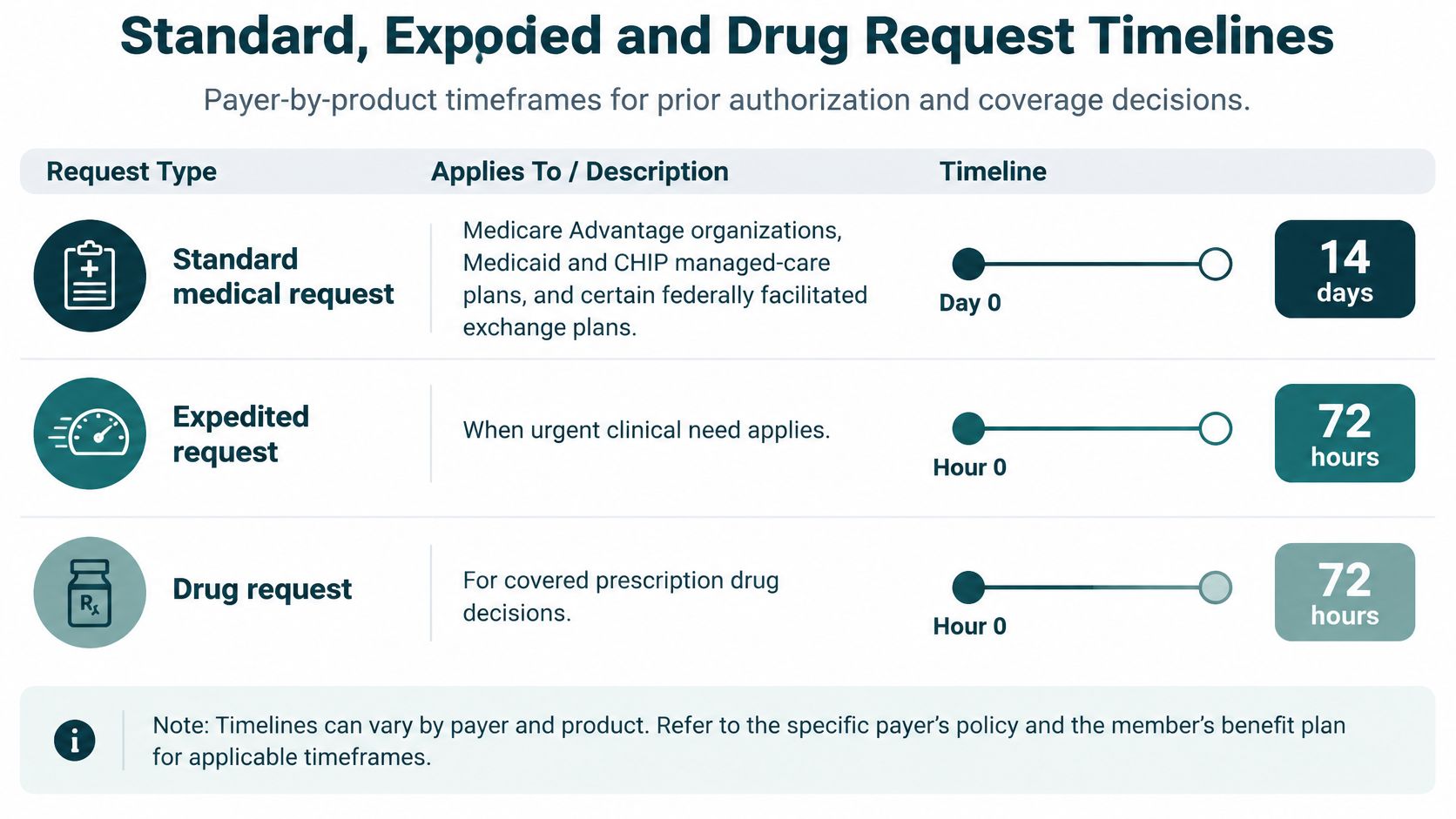
Use a payer-by-product lookup rather than assuming one deadline applies to every request. For impacted payers, federal decision timeframes for medical items and services differ by urgency. The CMS final rule fact sheet specifies 72 hours for expedited requests and seven calendar days for standard requests, beginning primarily January 1, 2026. The rule covers Medicare Advantage organizations, Medicaid and CHIP managed-care plans, and certain federally facilitated marketplace plans, but doesn't apply uniformly to every insurer or product.
| Request Type | Payer or Product | Decision Timeframe | Tracking Note |
|---|---|---|---|
| Expedited medical item or service | Medicare Advantage, Medicaid and CHIP managed care, certain Marketplace plans | 72 hours | Clock starts after a sufficiently complete request |
| Standard medical item or service | Same impacted payers | 7 calendar days | Log every missing-information notice |
| Drugs | Same impacted payers | Excluded from these specific timeframes | Follow the pharmacy benefit and payer process |
| Commercial medical request | Employer and individual plans | Confirm the payer's published timeframe | Verify the payer's published rule |
| Request under a state program | State Medicaid or other state programs | Confirm the applicable program timeframe | Confirm with the payer or state agency |
Track when the clock can start
The decision clock starts after the payer receives a sufficiently complete request. If the payer asks for missing information, record the notice, what was requested, and when the practice responded. A submission timestamp alone may not show when the payer had the information needed to review the case.
For each request, log the submission date, urgency classification, confirmation number, missing-information notices, and final response. Those details let a coordinator identify cases that need follow-up and help the practice assess whether the payer's timeframe has passed.
Drugs are excluded from these specific timing requirements. Pharmacy-benefit requests follow the relevant payer's process, and commercial plans or state programs may use different rules. Practice managers should verify the published requirement for each payer and product instead of applying the federal medical-service timeframes across the board.
Set an internal escalation date before the payer's deadline, such as one business day ahead. A deadline is not a promised approval date; early escalation gives staff time to check for a portal message, contact the payer, or route a clinical question before the patient's care plan is further delayed.
Handling Pends, Denials and Requests for More Information
A pend isn't a denial. A pend means the payer hasn't made a final decision and needs information or review; a request for more information usually identifies what to supply and may set a response window. A denial is a written decision with a reason. Treating all three as the same status can send staff down the wrong path or leave a response deadline unowned.
| Payer Signal | Likely Cause | First Action |
|---|---|---|
| Request for clinical records | Notes missing or not tied to the request | Attach the cited note section with its date and author |
| Rejection of the code | Code doesn't match the signed order | Confirm the code with the ordering clinician and resubmit |
| Form rejected as outdated | Old payer template used | Pull the current template and resend with the same data |
| Request for statement of medical necessity | Clinical rationale not written in the request | Route to the ordering provider for a signed statement |
| No confirmation number after upload | Portal or fax failure | Check the channel, resubmit through the same route, and log the attempt |
| Written denial with reason | Clinical criteria not met or documentation gap | Confirm the reason, set the appeal deadline, and brief the ordering provider |
Route the next action to the right person
For a pend or information request, log when it arrived, identify the specific item the payer needs, and check whether the question is administrative or clinical. Staff can retrieve and send existing records. If the payer needs a clinical explanation, the ordering provider should write or approve it. Send what was requested, keep a copy, and record the response date.
For a denial, compare the stated reason with the original request and chart before deciding whether to correct or appeal. A missing record or mismatched code may call for a corrected submission; a disagreement with clinical criteria requires provider involvement. A peer-to-peer review is a clinician-led discussion with the payer. Staff may arrange the call and gather records, but shouldn't conduct it or supply clinical judgment.
Appeals have their own forms and deadlines, which can differ by payer and plan. Verify the appeal window on the denial notice and prepare any letter with the ordering provider. An urgent denial may require an expedited appeal if the payer's process allows it, while a correctable error may need a new request instead. Staff should communicate the current status accurately and never promise that an appeal will succeed.
HIPAA Safeguards and Recommended Practices for Submission
A signed Business Associate Agreement is the legal baseline for prior authorization work. It does not decide which coordinator can open which request, how attachments move, or whether anyone checks the audit trail. Those are operational choices the practice has to make before the first fax goes out.
When an outside party handles protected health information for the practice, the practice needs a signed BAA before the assistant receives access. A sample BAA can be requested so the practice can review the terms before access is arranged. Requirements vary by work, systems, and parties, so the agreement should match the tasks performed. A remote assistant should receive only the access the practice authorizes, and the practice should document which systems and tasks are in scope.
Recommended controls for day-to-day work
Use multi-factor authentication on payer and EHR portals where available. Set role-based access so a coordinator can submit and track a request without seeing unrelated patient records. Turn on audit logs that show who viewed a request, downloaded a fax, or changed a status. A password manager keeps portal credentials out of shared spreadsheets and chat threads.
Keep one written rule: patient information travels only through approved secure channels. Don't send patient records or protected health information through MedicalVirtual's general website forms or email unless MedicalVirtual has expressly instructed the sender to use an approved secure channel. Review safe document workflows for clinics when mapping who can share, receive, and archive prior authorization attachments.
HHS does not recognize an official HIPAA certification. Ask for the BAA, training records, and written policies instead of relying on a certification badge. At MedicalVirtual, a signed BAA is in place before an assistant gets access to patient information, and the practice approves the software, access levels, and patient-facing workflows used by the assistant.
State privacy laws may impose stricter requirements than HIPAA, and payer portal terms can add conditions on who may submit and what may be uploaded. For a broader view of the rules that touch intake, disclosure, and vendor oversight, review regulatory compliance in healthcare. Confirm the obligations that apply to your organization with qualified counsel or a compliance professional.
Tracking Each Request and Assigning Ownership
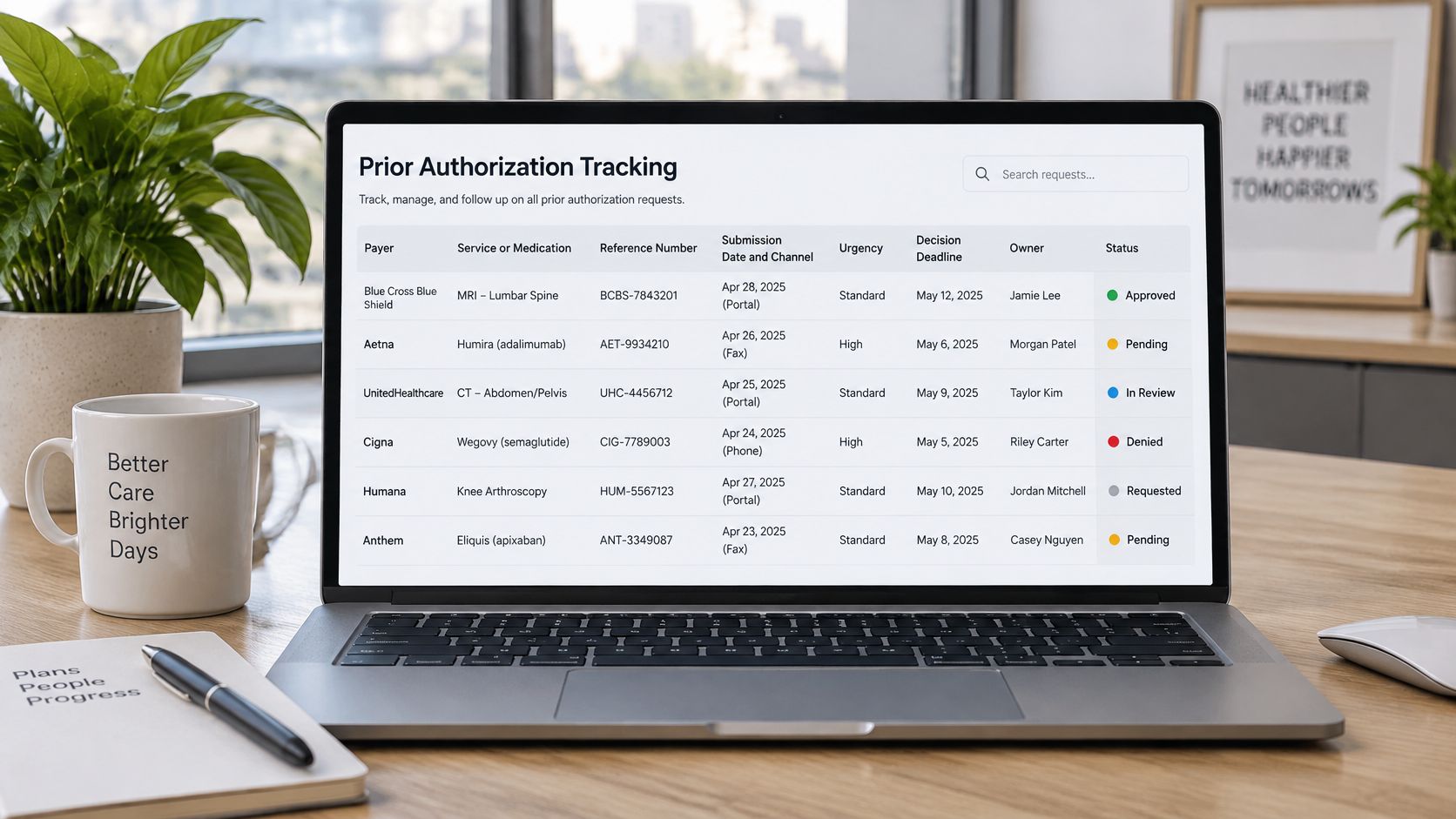
A tracking log is only as good as the owner attached to each row. Use one log with one row per request, and make the next action visible. A useful row records the payer, requested service or medication, reference number, submission date and channel, urgency, decision deadline, next follow-up date, current status, denial reason if applicable, appeal status, and who owns patient notification. Add a short status history so a handoff does not depend on memory. Keep the submitted form and attachment set in the practice-approved system, linked or indexed so another authorized team member can find them.
Assign work by responsibility
| Role | Owns | Must not do |
|---|---|---|
| Ordering clinician | Clinical rationale, peer-to-peer content, and approval of appeal letters | Delegate clinical judgment to administrative staff |
| Prior authorization coordinator or billing specialist | Prepare, submit, track, and escalate requests | Change clinical details without provider approval |
| Front desk or patient coordinator | Share status accurately and schedule after approval is recorded | Describe a request as guaranteed to be approved |
| Practice manager | Set escalation rules and review overdue work | Leave open requests without an accountable owner |
Ownership has to survive a shift change or a vacation. Name a backup for each role in the log, and make the next follow-up date actionable rather than a placeholder. A row marked pending with no owner and no date is just storage. The coordinator checks the payer portal, confirms the reference number, and records the next step before closing the task. If the payer asks for a missing clinical note, the coordinator routes that request to the ordering clinician or designated clinical reviewer the same day. The practice approves the software, access levels, and patient-facing workflows, and limits protected health information to the systems it chooses to grant.
A remote coordinator can gather records, check dates, monitor payer portals, and route clinical questions to the provider. They should not diagnose, select a substitute treatment, or represent a pending request as approved. MedicalVirtual's Prior Authorization Specialist submits, tracks, and escalates authorizations for imaging, procedures, and specialty drugs within the access the practice approves. Keep the supporting record traceable and retrievable inside that approved system; how to organize audit documentation describes a general method for organizing evidence that teams can adapt to their own files.
Review open items weekly, especially requests past their next follow-up date. That routine gives a manager a chance to assign an overdue call, route a clinical question, or notify the patient before a request disappears into an unmonitored queue. It also exposes patterns: one payer may consistently request the same missing field, and one request type may need a standing escalation path. Fix the workflow where the same gap repeats, not just the individual request.
Confirm Your Prior Authorization Workflow Before the Next Request
Before the next request goes out, confirm that the practice has each frequently used payer's current form, decision timeframe, and documentation requirements on file. Use one tracking log, and give every step a named owner. A form without an assigned follow-up is an incomplete workflow.
Start by gathering the current forms for the payers your practice uses most often. Verify each payer's rules for timing and for what counts as a complete request, then write down an escalation point for each request type. Confirm that everyone with access has the BAA, training, and role-based permissions required by your policy.
If you need outside support, a Prior Authorization Specialist can submit, track, and escalate requests for imaging, procedures, and specialty drugs within the access your practice approves. We can provide a sample BAA and insurance certificates through the MedicalVirtual team for review before any patient information is accessed. Outsourcing doesn't transfer the provider's clinical responsibility, and a low-volume practice may be able to manage the process in-house with a simple, consistently maintained log.
Review your last ten requests against the field table and tracking log, then fix the first gap you find.
The Takeaway
Treat each prior authorization form as the start of a managed request, not a one-time submission. Accurate identifiers, the right codes, focused clinical records, and a logged confirmation make the case easier to review and easier to follow.
Assign a named owner for every next step, keep payer requirements current, and escalate pends or denials to the right person. A reliable workflow protects staff time while helping patients and providers get a clear, accurate account of where each request stands.
MedicalVirtual connects U.S. medical practices with remote prior authorization specialists who submit, track, and escalate requests within the practice's approved workflows. If you're reviewing staffing support for your authorization process, visit MedicalVirtual to discuss your needs.