
Regulatory compliance in healthcare means continuous operational control of protected health information, not a one-time or official HIPAA certification. A signed agreement alone doesn't make a remote-staff arrangement compliant.
The stakes extend beyond a misplaced document: HHS's breach report to Congress states that more than 167 million individuals were affected by breaches involving unsecured protected health information in 2023. Remote staffing doesn't create that exposure, but it adds people, endpoints, communication channels, and vendor relationships that your practice must govern.
For owners and managers, the practical question is not just whether an assistant has completed privacy training. It is whether you can explain who may see patient information, which tasks they may perform, and what evidence you can produce when something goes wrong. That includes scheduling screens, call recordings, payer portals, billing edits, and messages, not just clinical notes.
A workable approach divides responsibility without losing accountability. Your practice approves workflows and grants access; the staffing organization meets its contractual and applicable legal duties; the assistant works within those boundaries. Providers retain clinical decisions.
You don't need a hospital-sized compliance department to establish that structure. You do need a documented risk analysis, an appropriate agreement, named control owners, individual accounts, and a response process that staff can follow during a busy shift. Those operational details determine whether remote support fits your practice safely.
Which Rules Apply Before Remote Staff See PHI
Hiring a trained assistant alone doesn't make a practice compliant. HIPAA compliance depends on people, agreements, technology, and the practice's procedures working together. HHS doesn't recognize an official HIPAA certification that substitutes for those obligations.
Enforcement reflects that operational focus: OCR's compliance report to Congress states that, since the Privacy Rule became effective in April 2003, OCR had received more than 374,321 complaints by October 31, 2024, and had investigated and resolved more than 31,191 cases through required practice changes, corrective actions, or technical assistance.
Rules that can bind a practice using remote assistants
| Rule | Who it binds | What it controls | Practical trigger |
|---|---|---|---|
| HIPAA Privacy Rule | Covered entities, their workforce, and business associates under applicable duties | Uses, disclosures, minimum necessary, patient rights | Calls, messages, charts, or schedules that include PHI |
| HIPAA Security Rule | Covered entities and business associates | ePHI safeguards, risk analysis, unique user IDs, audit controls | EMR, phone, billing, file-transfer, or remote-access systems |
| Breach Notification Rule | Covered entity notifies individuals and HHS; business associate notifies the covered entity | Incident evaluation, breach assessment, and notice clocks | Suspected unauthorized access to or disclosure of unsecured PHI |
| Business Associate Agreement | Contract required before a business-associate vendor handles PHI for the practice | Permitted uses, safeguards, subcontractors, incident reporting, PHI return or destruction | A staffing firm or vendor creates, receives, maintains, or transmits PHI |
| State privacy and recording laws | Practices and service providers subject to applicable practice-location and patient-location laws | Stricter privacy, call-recording consent, sensitive categories such as mental health | Multi-state patients, recorded lines, or behavioral health records |
| Payer integrity rules | Enrolled providers and personnel handling claims or authorizations | Accurate charges, eligibility, and authorization documentation | Charge entry, insurance checks, or prior-authorization work |
The Privacy Rule governs information use and disclosure. Apply minimum-necessary limits where required, rather than assuming everyone supporting a provider needs the full chart. Patient-rights workflows also need an owner, so an assistant doesn't improvise when someone requests records or a correction.
The Security Rule concerns electronic PHI and the safeguards around it. A scheduling application or voicemail platform belongs in the review when it contains patient information, even if nobody calls it a medical-record system. The Breach Notification Rule becomes relevant when an incident requires assessment and potentially notice, not merely when a vendor confirms a cyberattack.
Separate legal scope from operating instructions
State privacy, sensitive-record, and recording requirements need jurisdiction-specific review. Payer requirements also deserve their own workflow instructions: authorization approval doesn't authorize an assistant to alter clinical facts, and billing access doesn't confer authority to diagnose or treat.
For a broader organizational checklist, Freeform Company's guide to regulatory compliance obligations for 2026 can help frame questions for your compliance adviser, but healthcare-specific decisions should rest on applicable authorities. When scoping a HIPAA-compliant answering service, translate those obligations into scripts, permissions, and escalation routes rather than relying on the service description alone.
Mark each table row applies, does not apply, or needs counsel review. Record why, assign an owner, and retain the marked version in your compliance binder or controlled policy folder.
How to Include Remote Assistants in the Risk Analysis
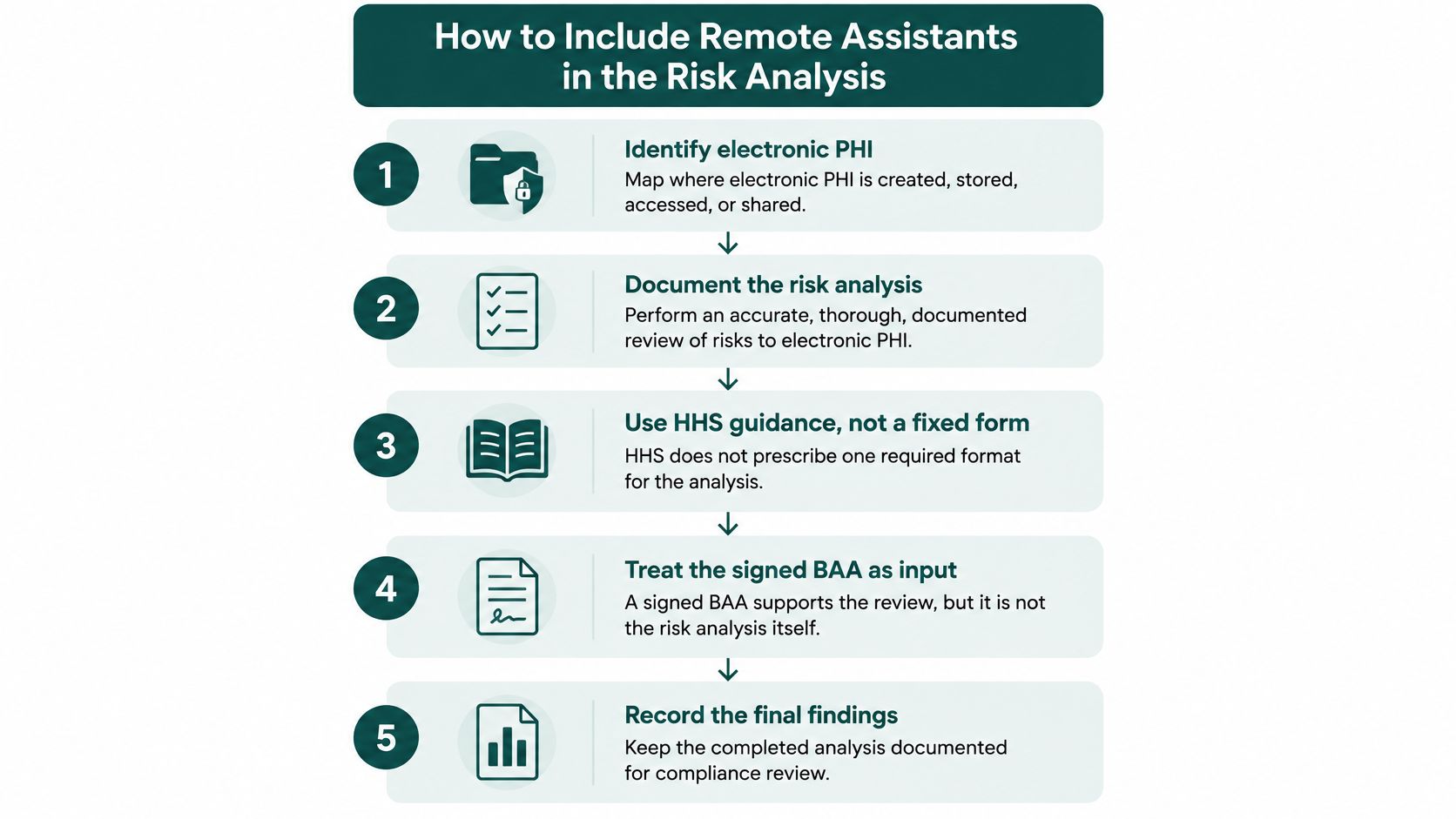
A remote assistant belongs in your risk analysis as a person using specific systems from a specific endpoint, not merely as a name under a vendor contract. HHS's risk-analysis guidance calls for an accurate, thorough, documented assessment of risks to the confidentiality, integrity, and availability of electronic PHI, without prescribing a single required methodology.
A signed BAA is an input to that assessment. It doesn't tell you whether an assistant can export records, whether voicemail files remain on a workstation, or how staff will continue scheduling when remote access fails.
Map the workflow before choosing safeguards
Consider a hypothetical primary-care office adding a remote receptionist and billing assistant. The receptionist works through the phone queue and scheduler; the biller reviews denials and edits claim fields. Both belong in the assessment even if neither downloads a chart.
Use this sequence to turn that workflow into a defensible record:
List where electronic PHI moves. Inventory the EMR, practice-management software, scheduling tools, phone platform, billing applications, prior-authorization portals, file transfer, messaging, and remote-access services. Include temporary locations such as downloaded attachments and exported reports, then decide whether those locations should be permitted.
Add the people and endpoints. Record each role, workstation expectations, account owner, access location, and any cross-border processing. If work occurs from a home office, document expectations for screen visibility, household access, device security, and approved communications.
Describe reasonably anticipated threats. Use concrete events: a phishing message captures credentials, a receptionist selects the wrong patient, a lost device contains downloaded files, or a biller exports more information than the task requires. A list that says only cyber risk won't help a manager select controls.
Identify vulnerabilities and evaluate likelihood and impact. Shared accounts, unrestricted exports, unsupported devices, and unclear identity-verification scripts are different weaknesses requiring different fixes. Use plain-language ratings supported by an explanation, rather than assigning scores nobody can defend.
Select safeguards and name the owner. Record the control, who implements it, how you'll verify it, and what remains unresolved. Where an implementation specification is addressable, document the reasoned decision rather than treating the label as permission to ignore it.
Reassess when the work changes. A new assistant, replacement EMR, added payer portal, expanded role, or different vendor can change the original assumptions. Update the affected workflow instead of changing the document's review date.
Cover availability and integrity as well as disclosure
Managers often concentrate on confidentiality and overlook the other parts of the assessment. A billing assistant who overwrites accurate claim information creates an integrity problem; an unavailable phone platform can create an availability problem. Your analysis should address both, including correction procedures and a fallback route for time-sensitive messages.
A spreadsheet can work for a small practice if it connects each system and workflow to threats, vulnerabilities, safeguards, and responsible people. A larger group may need a centralized register because local managers otherwise make inconsistent decisions. The useful test is whether someone unfamiliar with the setup can understand why access was approved and how its risks are controlled.
Practical rule: Assess what the assistant can actually do in the system, not just what the job description says they should do.
Keep the inventory alongside the policies and supporting evidence. I recommend reviewing it at least annually as an operating practice, and after material changes, rather than treating that recommendation as a universal HIPAA deadline. Confirm unusual state, specialty, and payer obligations with qualified counsel or a compliance professional.
What the Business Associate Agreement Must Settle
A confidentiality agreement tells an assistant not to disclose information. A Business Associate Agreement establishes the obligations of an organization handling PHI on behalf of a covered entity. Those documents serve different purposes, and one doesn't replace the other.
HHS's business-associate guidance explains the relationship and the required contractual protections, including permitted uses and disclosures, safeguards, reporting, and relevant obligations for subcontractors. A staffing firm supporting reception, billing, scribing, or authorizations may be a business associate when its services involve handling PHI for the practice.
Establish the legal relationship accurately
A staffing organization isn't automatically a covered entity merely because it supplies healthcare administrative personnel. That doesn't leave it outside HIPAA: business associates can be directly liable for impermissible uses or disclosures and failures to safeguard electronic PHI.
The classification should reflect the actual arrangement. A person hired directly into your workforce raises different documentation questions from personnel supplied through an outside organization. Have counsel confirm the relationship rather than applying the same contract label to every remote worker.
A suitable BAA must address:
- Permitted activity: The uses and disclosures necessary for the contracted services, rather than an unrestricted right to use patient information.
- Safeguards and reporting: Protection of PHI, reporting of breaches and security incidents, and cooperation with the practice's response.
- Subcontractor duties: Applicable protections flowing to subcontractors that handle the information.
- End-of-engagement handling: Return or destruction of PHI where required and feasible, with appropriate treatment of information that cannot be returned or destroyed.
Fill the operational blanks before onboarding
A legally adequate template can still leave a manager unsure what happens during a problem. The agreement or associated onboarding plan should name who provisions accounts, who can request termination, who receives incident reports, who preserves logs, and who coordinates the end of an assignment.
Ask for operational answers, not assurances. If the assistant reports a misdirected message after the practice manager leaves, the escalation route needs a backup contact. If the phone platform holds recordings, somebody must know how to preserve them without exporting them into an unapproved location.
A contract assigns obligations. A named owner and a tested procedure make those obligations usable.
At MedicalVirtual, HIPAA training and a signed BAA must be completed before an assistant receives PHI access. We complete the appropriate agreements and configure permissions before patient information is accessed; the practice still controls its software, access levels, and patient-facing workflows.
For a behavioral-health group, don't assume a standard reception setup is sufficient. Keep psychotherapy notes outside routine administrative access unless a reviewed workflow establishes otherwise, and have counsel evaluate sensitive-record and state mental-health requirements. Recorded calls and multi-state patients also warrant specific review rather than a generic contract checkbox.
The production-login gate should be explicit: training recorded, BAA executed, permissions approved, escalation contacts named. If the paperwork is ready but nobody owns incident escalation, onboarding isn't finished.
Role Limits for Reception, Billing, and Documentation
Use the following matrix as a starting access design, then narrow it to your specialty and software. The point isn't to give everyone in a role every listed permission. It's to identify the information needed for assigned work and establish a clear stopping point.
Remote role boundaries and control owners
| Role | Typical PHI | May do | Must not do | Control owner |
|---|---|---|---|---|
| Virtual medical receptionist | Demographics, schedule, messages, insurance on file | Answer calls, book and confirm visits, route messages to staff | Diagnose, give treatment advice, or use a shared login | Practice sets phone scripts and unique user access |
| Patient intake coordinator | New-patient forms, records requests, reminders | Onboard patients, request records, verify identity | Release records outside the practice's authorization rules | Practice approves the release workflow |
| Insurance verification specialist | Eligibility and benefits details | Check coverage before the visit and document limits | Guarantee payment or alter clinical necessity | Practice defines what may be told to patients |
| Prior authorization specialist | Orders, clinician-supplied diagnoses, payer portals | Submit, track, and escalate authorizations | Decide medical necessity or change the order | Ordering clinician supplies clinical facts |
| Billing assistant | Charges, claims, denials, statements | Enter approved charges, work denials, follow up with payers | Change clinical notes to obtain payment | Practice owns coding policy and user rights |
| Virtual medical scribe | Visit details entered in the EMR | Document for same-day provider review | Sign provider notes or make independent clinical decisions | Provider reviews, edits, and signs |
Make the clinical boundary usable during a call
Administrative support isn't clinical care. Clinical decisions, diagnosis, and treatment remain with appropriately licensed healthcare professionals. A receptionist who hears symptoms should follow the practice's routing and emergency scripts, not decide whether the patient can safely wait.
Prior-authorization support requires similar discipline. The assistant can assemble the clinician's facts, submit documentation, check status, and flag a payer request. If the payer asks for a different diagnosis or treatment justification, the assistant sends that question to the clinician rather than selecting an answer that appears more likely to obtain approval.
For remote medical scribe support, define how draft documentation is attributed, corrected, and presented for provider review. Don't let a documentation backlog become a reason to blur authorship or transfer the provider's review responsibility.
Adjust the profile for the specialty
Behavioral-health reception needs careful message handling because even an appointment reminder can disclose that someone receives treatment. Specify what may be left on voicemail, which contact preferences staff must check, and who handles requests involving especially sensitive records. Administrative convenience isn't a reason to expose psychotherapy notes to scheduling personnel.
Dental and optometry front desks also handle identity, insurance, payment, and health information. Narrower clinical content doesn't justify informal access practices. Veterinary clinics are generally outside HIPAA's human-health framework, but managers should still establish client-privacy, payment-data, and recording procedures and confirm applicable state obligations.
For multi-site groups, build a tested role-based access profile instead of copying whichever permissions the previous employee happened to have. Document approved exceptions separately, including the business reason and approving manager. That makes transfers and replacement hiring easier to review without gradually expanding access over time.
Attach the matrix to each job description and use it during training. The practice sets phone scripts, release workflows, and software permissions; the vendor doesn't widen them to make a task easier. Reject or reroute any assignment that requires a license the assistant doesn't hold.
Unique Accounts and the Logs That Prove Access
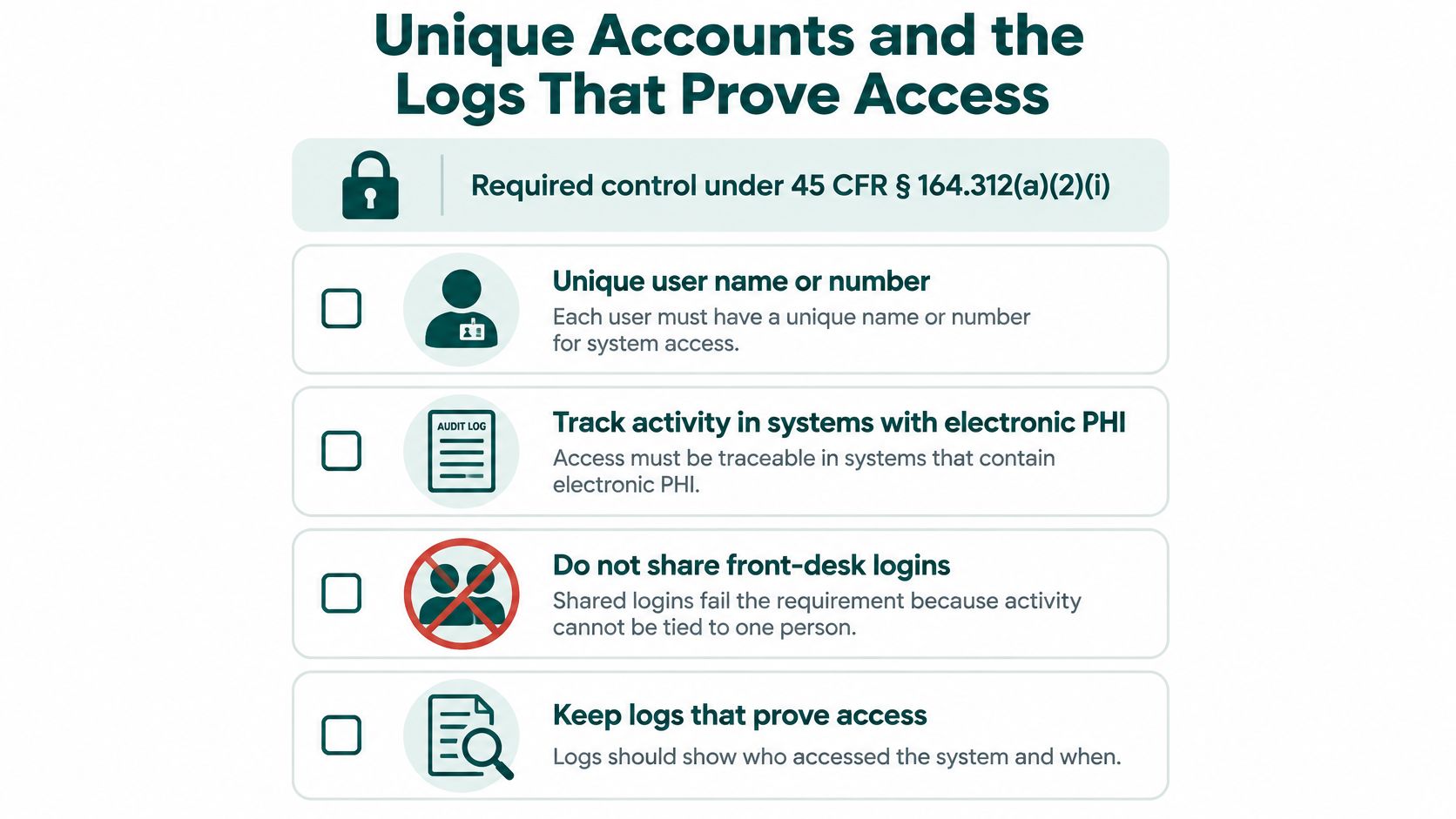
Unique user identification is a required control, not a preference for remote work. HHS's technical-safeguards guidance identifies 45 CFR § 164.312(a)(2)(i) as requiring a unique name or number to identify and track each user's activity in systems containing electronic PHI.
A shared front-desk login undermines that traceability. When someone changes a phone number, opens an unrelated chart, or enters a charge, you need to connect the action to a person rather than a room, shift, or staffing company.
Provision access that matches the work
Grant each assistant an individual account in approved EMR, phone, billing, and other tools that support named users. At MedicalVirtual, clients grant access under their own credentialing and access-control policies, as they would for an in-office employee. PHI access is limited to the systems the practice chooses to grant.
Then test the permissions. A receptionist may need to schedule and send messages without submitting charges or downloading records. A billing assistant may need claim-edit functions without access to unrelated clinical modules.
Use these operating standards:
- No password sharing: Staff shouldn't borrow a provider's account to finish a task or use a departed employee's credentials while waiting for provisioning.
- Controlled shared queues: A team inbox can support work if access uses individual authentication and appropriate tracking; a shared password doesn't provide the same accountability.
- Reviewed access safeguards: Maintain emergency-access procedures and assess automatic logoff and encryption. Addressable specifications require a reasoned implementation decision, not silent omission.
Retain evidence your manager can interpret
HHS's Security Rule overview identifies audit controls as mechanisms to record and examine activity in systems containing or using electronic PHI. Enable available EMR, identity-provider, VPN, and telephony logs according to the risk analysis, and verify that the records are retrievable.
A useful review connects user, system, timestamp, and action. Look for unexpected chart access, bulk exports, unusual administrative changes, and activity outside an assistant's approved schedule. Off-hours activity isn't automatically misconduct, but it should have an explainable business reason.
A small dental group may use software-generated reports and a documented manager review rather than a dedicated monitoring platform. The trade-off is coverage: a simple report must still expose the actions you need to investigate. If a vendor's report only lists active users, it isn't evidence of which charts they opened.
Evidence test: If a patient questions access to their record, can your practice retrieve a meaningful activity trail without relying on someone's memory?
Keep a compact access register containing user, role, systems, approval, date granted, last review, and date disabled. Disable accounts promptly when assignments end, ideally as part of the same offboarding event rather than a later cleanup.
Device retirement belongs in that process too. Beyond Surplus's discussion of chain of custody for retired devices is a useful reference when designing handoff and disposition records. Account removal doesn't resolve residual information on equipment, and equipment disposal doesn't prove that remote credentials were revoked.
The First Day After a Suspected Privacy Incident
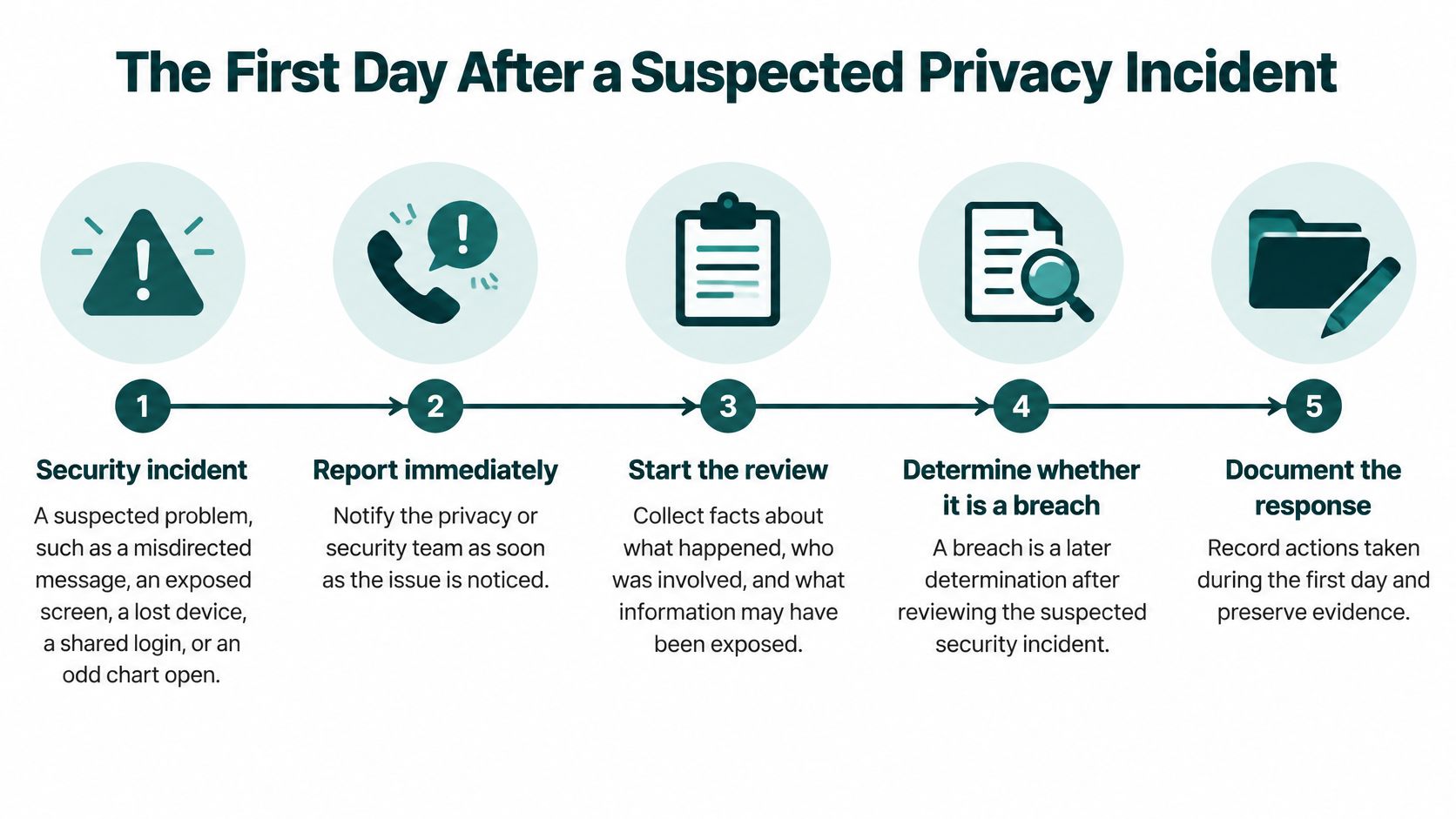
A security incident is a suspected or detected problem requiring action. A breach determination requires further assessment of what happened to unsecured PHI. Staff shouldn't wait for that legal conclusion before reporting a misdirected message, exposed screen, lost device, shared credential, or suspicious chart access.
Treat a potentially impermissible disclosure seriously while the privacy officer evaluates the facts. Uncertainty is a reason to preserve evidence and escalate, not a reason to label the event harmless.
Run containment and fact-finding together
The assistant's initial job is straightforward: stop the activity, report it to the named contact, and preserve relevant information. The assistant shouldn't independently decide that a recipient seems trustworthy enough to disregard an accidental disclosure.
The manager or privacy officer should coordinate the response:
- Receive and record the report. Capture when the issue was discovered, who reported it, and what the person observed. Separate known facts from assumptions.
- Preserve messages, logs, device details, and relevant screenshots within an approved evidence location. Don't delete the trail while trying to tidy up the mistake.
- Contain possible misuse. Disable an account, reset credentials, suspend a risky workflow, or isolate a device as appropriate, while coordinating evidence preservation.
- Identify the information involved, affected individuals, recipients, and evidence of viewing or acquisition. Include what mitigation occurred and what remains unknown.
- Document the conclusion. The privacy officer, with qualified support when needed, should record the assessment and why notice is or isn't required.
If a receptionist sends a reminder to the wrong recipient, preserve the message and recipient details before attempting mitigation through the approved process. Don't ask the receptionist to investigate the recipient privately or move patient information to a personal messaging account.
Breach notice deadlines
The following outer deadlines apply to breaches of unsecured PHI, not as permission to delay escalation. A business associate must supply usable facts to the practice promptly enough for the practice to meet its own obligations.
| Notice | Who sends it | Deadline |
|---|---|---|
| Business associate to covered entity | Vendor or staffing firm | Without unreasonable delay, no later than 60 days after discovery, under HHS's breach-notification guidance |
| Affected individuals | Covered entity | Without unreasonable delay, no later than 60 days after discovery |
| HHS, breach affecting 500 or more individuals | Covered entity | Without unreasonable delay, within 60 calendar days of discovery |
| HHS, breach affecting fewer than 500 individuals | Covered entity | Within 60 days after the end of the calendar year of discovery |
These deadlines summarize the same HHS guidance; the covered entity generally manages individual, HHS, and potentially media notifications. The practice's internal escalation expectations should be substantially faster than the legal outer limits.
A small event doesn't fall outside oversight merely because of its size: OCR's breach-reporting guidance explains that incidents affecting fewer than 500 individuals may still be investigated. Don't substitute a patient-count estimate for a documented assessment.
Keep an incident evidence packet
Your onboarding plan should cover identity verification, records requests, sensitive communications, and suspected security incidents. Staff need to rehearse the escalation path before they face an upset caller or a suspicious login mid-shift.
Retain the reporter, discovery time, systems, users, patients potentially affected, evidence preserved, containment actions, notification decisions, and written conclusion. Assign an owner to unresolved questions so the initial report doesn't become the last documented action.
Training and Vendor Oversight for Remote Assistants
Training should show an assistant how your practice expects work to happen. Knowing the phrase minimum necessary doesn't tell a receptionist how to verify a caller, handle a sensitive voicemail, or route an unexpected records request. Practice-specific instruction turns general privacy knowledge into usable decisions.
At MedicalVirtual, every assistant completes HIPAA training before starting with a client, receives annual refresher training while placed, signs a confidentiality agreement, and passes a background check. Software familiarity varies by candidate, so practice-specific instruction may still be necessary even when someone has used the same EHR elsewhere.
Test decisions rather than terminology
Consider a hypothetical caller who identifies herself as a patient's spouse and asks for laboratory results. The assistant should follow the practice's identity and disclosure procedure, avoid releasing results merely because the caller knows personal details, and route the request appropriately. The useful training question is what the assistant does next, not whether they can recite a definition.
Include realistic exercises covering:
- Identity and authority: Verify the caller and follow the approved process for determining whether disclosure is permitted.
- Voicemail and recordings: Check communication preferences, use approved wording, and follow the reviewed recording procedure.
- Remote workspace: Protect screens and conversations from household members and use only approved channels.
- Escalation: Identify the primary and backup contacts and practice reporting an uncertain incident.
Document completion dates, topics, and any corrective coaching. Refresh instruction when duties, software, or procedures change, rather than assuming an old completion badge covers a new workflow.
Give oversight a repeatable rhythm
I recommend a monthly sample of remote-account activity and a quarterly reconciliation of active placements, permissions, and assigned duties. That's a proposed management routine, not a universal regulatory timetable; adjust it to your risk analysis, incident history, and workload. Larger groups may need automated alerts and centralized reviews.
Ask for evidence that helps you verify operations: training records, relevant policies, reporting contacts, and a clear disciplinary or sanction process. A completion badge can support the file, but it doesn't establish that staff follow your scripts or that access remains appropriate.
When evaluating healthcare business-process support, assign an internal manager to review exceptions and resolve ownership gaps. More monitoring consumes staff time, while too little leaves inappropriate access harder to detect. Choose a review scope your manager can sustain, document findings, and escalate patterns rather than repeatedly correcting the same error informally.
The Takeaway
Regulatory compliance in healthcare is demonstrated through controlled work and retrievable evidence. For remote assistants, that means an approved person performs an approved task in the practice's chosen systems, with clear boundaries and a documented way to investigate problems. Contracts and training support that arrangement, but they don't replace the practice's risk analysis, permissions, or oversight.
Before releasing production access, confirm that the applicable rules have been reviewed, the workflow inventory is complete, the BAA and training are on file, individual accounts are approved, and incident contacts are named. Attach role limits to the assignment and hold PHI access if a necessary safeguard remains unresolved. Confirm state, specialty, and payer edge cases with counsel or a qualified compliance professional, while keeping clinical decisions with licensed providers.
MedicalVirtual connects U.S. practices with pre-vetted, bilingual Latin American healthcare administrative staff, with training and a signed BAA completed before PHI access. Visit MedicalVirtual to share your role, software, clinic hours, and access boundaries so candidate interviews reflect the work your practice needs.