

92% of patients were asked to complete or repeat intake paperwork at least once a year, according to a 2026 Tebra survey of 703 U.S. patients and 298 healthcare professionals. A patient intake form is the structured packet a medical practice uses before or at a first visit to collect identity, coverage, relevant history, notices, and any separate permission needed to obtain outside records.
The practical answer isn't a longer questionnaire. It's a packet divided into clearly labeled sections, with required and optional fields, a defined destination for each answer, and a person responsible for reviewing it. Patients should complete it before the clinician is ready whenever they can, but submission shouldn't automatically turn their answers into a verified chart.
For practice managers considering remote staff, the distinction matters. An assistant can chase a missing member ID, confirm a subscriber's name, and queue an incomplete medication list. That doesn't mean the assistant should interpret an allergy, translate a legal notice independently, or decide whether a patient can receive care.
A workable intake process separates registration from clinical history and authorizations. It also gives patients a phone or desk alternative when the portal doesn't work for them, without giving every administrative worker access to everything they disclose.
What a Patient Intake Form Does
Say a new patient arrives after completing the online packet. Their coverage section contains a spouse's subscriber details, the medication list says only “blood pressure pills,” and the signature page combines treatment permission with an outside-records release. The form is submitted, but registration, clinical review, and records retrieval still need different kinds of work.
That's the difference between collecting answers and preparing a visit. The form should help staff identify the patient, establish coverage, route clinical information, and explain what each signature means. It shouldn't force the receptionist to untangle those jobs while the provider waits.
Completion isn't the same as readiness
The same Tebra vendor survey reported an average of 13 hours per week spent processing, correcting, or following up on intake paperwork. Approximately 28% of forms needed staff intervention before the patient could be seen, including 29% in internal medicine and 28% in primary care or family medicine.
Patients also described the consequences: 19% supplied inaccurate or incomplete information because the process felt repetitive or rushed, while 27% delayed, canceled, or avoided an appointment to avoid paperwork. These are vendor-survey findings, not regulatory benchmarks or predictions for your practice.
Practical rule: Mark a packet ready only when the right people have reviewed the fields that matter for that visit.
A remote coordinator can resolve registration gaps and route unanswered clinical questions. A clinician must still review information that affects care.
Patients also need context, not just signature boxes. For behavioral-health practices, Uptown Psychology's resource on understanding confidentiality in your first session can help patients prepare questions about privacy. Educational material supports the conversation; it doesn't replace your notices, authorization language, or the clinician's explanation.
Patient Intake Form Field Categories
| Section | Purpose | Core fields | Who handles it | When |
|---|---|---|---|---|
| Demographics and identity | Match the chart and contact the patient | Legal name, date of birth, address, phone, email, preferred language, emergency contact | Patient or front desk; intake coordinator confirms | Before the visit or at arrival |
| Insurance and guarantor | Check eligibility and route statements | Payer, member ID, group, subscriber, relationship, guarantor | Insurance verification or intake staff | Before the visit when the card is available |
| Clinical history | Give the clinician a safe starting point | Reason for visit, conditions, surgeries, medications, allergies, pharmacy | Patient enters; clinician reviews; admin does not interpret | Pre-visit, with same-day cleanup if incomplete |
| Screenings the provider ordered | Capture a chosen questionnaire | Only screens the practice has selected, such as a depression screen | Patient completes; clinical staff scores under the practice's protocol | Pre-visit or in the visit workflow |
| Notices and routine consents | Explain privacy, payment, and care | Notice acknowledgment, financial policy, treatment consent | Patient signs; staff explains, does not pressure | Before care when the practice uses them |
| Records release | Obtain outside records for a stated purpose | Source, recipient, information, purpose, expiration, revocation right | Intake coordinator prepares; patient signs | Only when outside records are needed and authorization is appropriate |
Build the packet in visit order
Start with identity and contact information because staff need to match the patient before attaching anything to a chart. Include sex or gender fields only with a clear operational or clinical purpose, and label them precisely. A name used in conversation shouldn't overwrite a legal-name field needed for matching or billing.
Coverage comes next, with the patient, subscriber, and guarantor kept distinct. Those people may be the same person, but your form must also work when they aren't. A caregiver may help complete relevant sections when the practice has documented permission or authority, rather than accepting whoever answers the phone.
Clinical history needs a different destination and reviewer. Patients can describe symptoms and list medications; administrative staff can identify blanks and request clarification using an approved script. They shouldn't decide that a condition is irrelevant or convert a patient's wording into a diagnosis.
Add questionnaires deliberately
A primary-care practice may include a provider-selected depression questionnaire. That doesn't justify attaching every available screening instrument to every appointment. Each questionnaire needs an owner who decides when it applies, who reviews it, and what happens when an answer requires follow-up.
Keep notices and routine agreements recognizable as their own documents. Acknowledging a privacy notice, accepting a financial policy, and authorizing a particular disclosure serve different purposes even when the patient completes them during the same session.
The table is also a staffing map. For every row, identify who may enter information, who may correct it, and who gives final approval. The detailed field rules below turn those broad categories into questions a patient can answer reliably.
What to Put in Each Form Section
| Field | Required when | Build note |
|---|---|---|
| Legal name | Always in the standard registration workflow | Ask separately for the name the patient uses |
| Date of birth | Always in the standard registration workflow | Confirm at check-in because it drives matching |
| Preferred language | Always offered during registration | Capture before showing translated instructions |
| Member ID and group number | When billing insurance and the plan uses those identifiers | Keep patient and subscriber fields distinct |
| Subscriber name and relationship | When the subscriber is not the patient | Prevents subscriber details being mistaken for patient identity |
| Social Security number | Only with a documented billing or matching reason | Store in a secure field, never as a default |
| Allergy with reaction | Always addressed in clinical history | Pair each allergy with a reaction field and an unknown option |
| Medication with dose and frequency | Always addressed in clinical history | Separate name, dose, and frequency; allow unknown details |
| Pregnancy, implanted devices, bleeding risk | Only when relevant to the service | Not on every dental or therapy form |
| Emergency contact | Per the practice's documented policy | Confirm the policy before making it mandatory |
These are recommended build rules, not a universal legal checklist. Required should mean the visit or claim can't proceed safely or accurately without the answer. It shouldn't mean that an uncertain patient must invent an answer to get past the screen.
Identity and coverage
Ask for legal name, date of birth, and the name the patient uses in separate fields. Capture preferred language early enough to affect the instructions, not at the end of an English-only packet. Don't make a Social Security number the default identifier when your registration workflow has no documented need for it.
For pediatrics, collect parent or guardian identity, relationship, and the information your practice needs to establish who may consent. An emergency contact isn't automatically the person authorized to make decisions. A bad entry such as “Mom” without a name or relationship record leaves staff unable to confirm who is calling.
Use structured insurance fields plus an approved card-upload option rather than a paragraph labeled insurance information. Include helper text beneath unfamiliar terms:
- Member ID: Enter the identifier printed on the insurance card, including letters.
- Guarantor: Identify the person responsible for the patient's account.
- Pharmacy: Give the pharmacy name and location, not just the chain.
Say an adult primary-care patient is covered through a spouse. If the form stores the spouse as the patient, staff may search eligibility under the wrong identity even when the card image is readable. A separate insurance verification form workflow helps turn those entries into a pre-visit check rather than an assumption that coverage is active.
Clinical history and specialty questions
Use separate medication-name, dose, and frequency fields. “A small white tablet every morning” is a reason to request clarification, not permission for an assistant to identify the drug. Let patients indicate that they don't know and bring a list or containers for clinical review.
Place a reaction field beside each allergy. “Penicillin” without a reaction needs clarification, while a blank allergy section must not be assumed to mean no known allergies. Keep patient-reported answers distinguishable from clinician-reconciled information.
For the reason for visit, invite a brief description in the patient's own words. Don't force patients to choose a diagnosis they haven't received. Behavioral-health symptom narratives should go to the clinical team rather than appearing in the general front-desk work queue.
Ask about pregnancy, implanted devices, or bleeding risk when the service makes the answer relevant. A procedure-focused question needs a clinical owner; it shouldn't appear on every dental or therapy packet just because the template contains it.
A required field should identify a real dependency, not make a questionnaire look complete.
Leave these out of the general packet
- Blanket lifetime releases: Don't substitute permission to share everything indefinitely for a purpose-specific authorization.
- Payment-card numbers: Use the practice's approved payment workflow rather than storing card details in clinical form answers.
- Administrative diagnostic judgments: Don't ask an intake coordinator to decide whether symptoms establish a condition or make a patient suitable for treatment.
Paper Forms Versus Digital Intake
By 2024, certified EHR adoption had reached more than 99% of non-federal acute-care hospitals and 91% of office-based physicians, according to HealthIT.gov's adoption summary, yet an electronic record doesn't mean intake is structured or integrated.
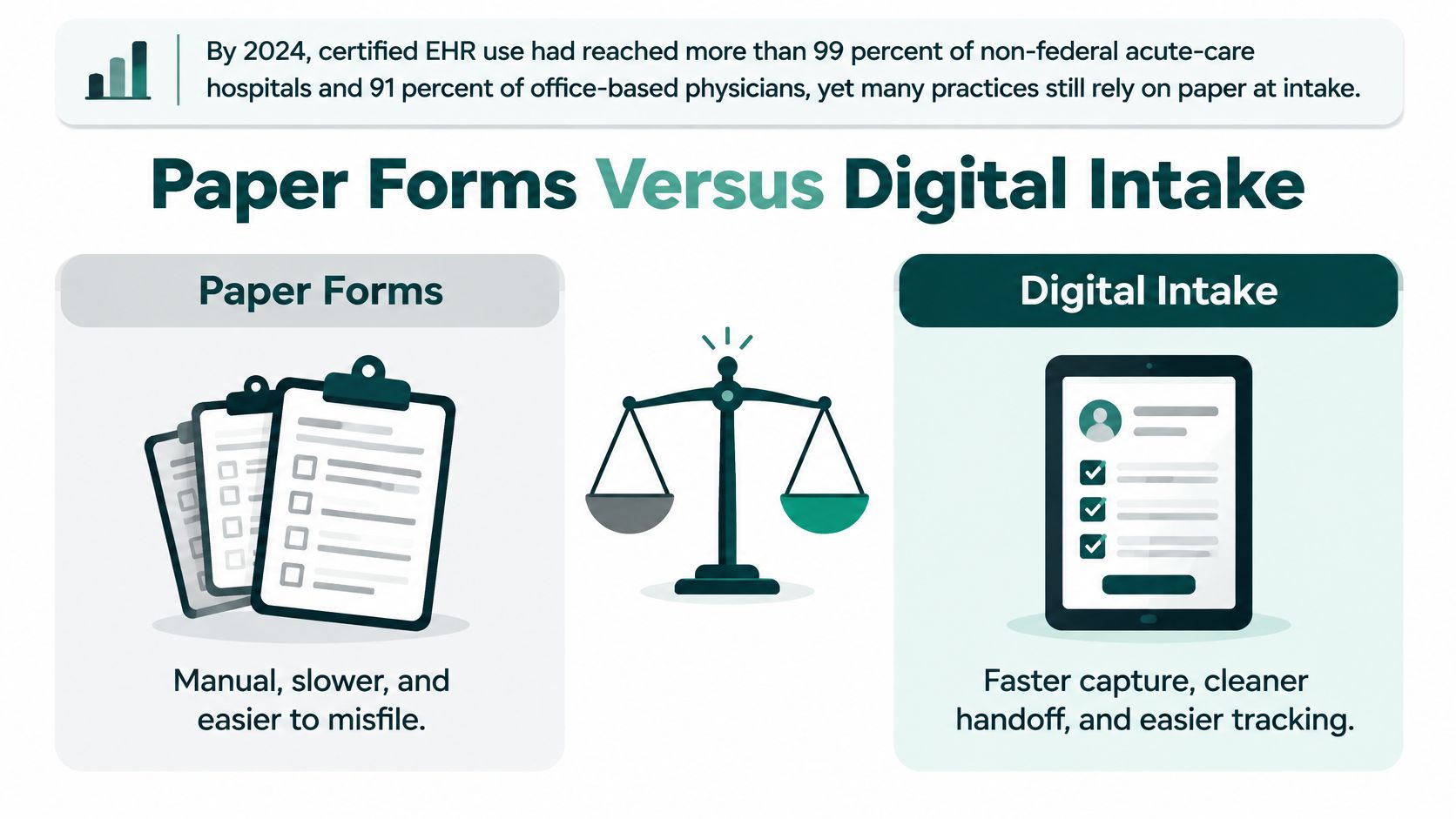
Nearly 90% of patients welcomed digital registration in Experian Health's 2024 State of Patient Access survey. In that survey, 85% didn't want to complete paperwork again after providing the same information elsewhere, as described in Experian Health's patient self-service analysis.
| Criterion | Paper packet | Digital form | Hybrid |
|---|---|---|---|
| Finished before arrival | Requires delivery and return | Supports advance completion if access works | Advance completion with a desk backup |
| Fixing a blank or wrong field | Staff clarifies and documents a correction | Inline validation plus human review | Corrections follow the version used |
| Another language | Translated printed packet | Translated screens and messages, not just a toggle | Translated core form plus language support |
| Audit of who changed data | Requires dated, attributable corrections | Field history if supported and configured | Final storage system determines traceability |
| Staff time | Retyping and document handling | Less retyping when answers map correctly | Staff concentrate on exceptions |
Choose the path patients can actually use
Digital-first works well for established portal users when known information is prefilled and every imported answer remains correctable. For a mixed-access patient panel, hybrid is a sensible starting point: send forms ahead, offer an approved desk tablet, and retain a short paper alternative. Age alone shouldn't determine which route a patient receives.
Paper has an access advantage, but the whole clipboard may expose information to anyone handling it. An emailed PDF isn't, by itself, a secure intake system. Digital forms also create friction when patients must establish an account to confirm basic registration details.
Use privacy screens and a cleaning process for shared tablets, and never have staff photograph insurance cards on personal phones. If patients routinely arrive with blank forms, test the invitation, authentication, and mobile experience before adding more reminders or rewriting the questions.
Consent Signatures and HIPAA Authorizations
Retire HIPAA consent as a catch-all document label. Under HHS guidance on authorizations, consent for treatment, payment, and healthcare operations is optional under the HIPAA Privacy Rule, while written authorization is generally required for uses or disclosures the rule doesn't otherwise permit.
That distinction doesn't mean treatment consent is irrelevant or that no other law applies. It means the Privacy Rule's treatment of routine uses isn't the same as an authorization for a particular disclosure. State requirements and the actual purpose of the document still need review.
Give each signature a clear job
A new-patient packet may contain these separate documents:
- Privacy notice acknowledgment: Records that the Notice of Privacy Practices was made available or received, using the practice's approved process.
- Financial and treatment agreements: Explain payment policies and treatment permissions the practice uses.
- HIPAA authorization: Addresses a specific disclosure when authorization is required, including an outside-records request where appropriate.
Don't assume every provider-to-provider records request requires patient authorization. Determine the lawful basis for the particular exchange and any additional restrictions before choosing the form.
A valid authorization uses plain language and identifies the information, the disclosing party, the recipient, the purpose when applicable, and an expiration date or event. It must also explain the patient's right to revoke in writing, with the complete form reviewed for all applicable requirements.
Consider a therapy clinic collecting an indefinite release to anyone involved in the patient's care. Reusing that signature later for a disability-related disclosure creates a mismatch between what staff intend to send and what the patient understood. A narrowly described recipient, purpose, and information set gives staff a usable instruction rather than an invitation to guess.
Separate disclosure choices from routine registration
A declined release should trigger review of that specific request, not automatic cancellation of a routine visit. Staff can record the decline and route any genuine documentation dependency to the designated practice lead. They shouldn't pressure the patient to sign because the software shows an incomplete packet.
Signature check: Ask what the signature authorizes before deciding what its absence prevents.
This is operational guidance, not legal advice. Behavioral-health, substance-use, and reproductive-health information can involve additional federal or state restrictions; confirm current obligations with qualified counsel.
No assistant or product should be presented as HIPAA certified; HHS doesn't offer that certification. Training and paperwork also don't replace appropriate safeguards.
Our assistants don't start with a client until HIPAA training is complete and a confidentiality agreement is signed. We can provide a sample BAA for review before patient-information access is arranged. Patient records and PHI shouldn't be sent through our general website forms or email unless we've expressly instructed the sender to use an approved secure channel.
When Patients Cannot Finish the Form
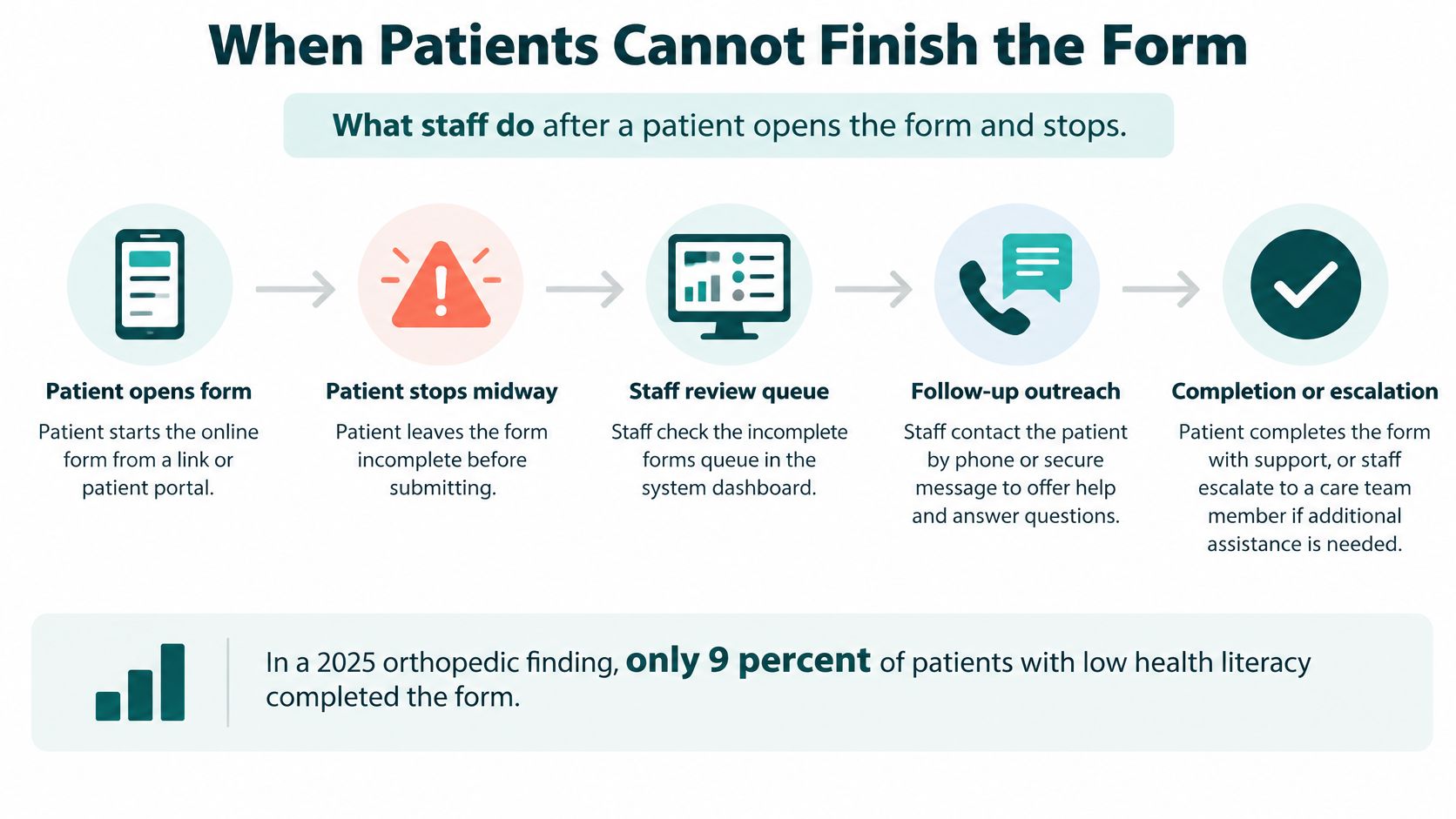
A digital-only process can leave some patients less prepared for care. A 2025 study discussed in JMIR reported portal questionnaire completion by 9% of orthopedic patients with low health literacy, compared with 25% with high health literacy.
Language barriers begin before the questions. A 2025 analysis described by Michigan Medicine examined 511 hospitals in counties with substantial limited-English-proficiency populations: 29% offered English-only portal access, nearly 60% offered English and Spanish only, and 11% offered those languages plus another.
Give stalled forms an exception path
When a patient opens the form and stops, staff need an assigned queue and an action, not another automated reminder.
- Record preferred language at scheduling. Don't wait for the patient to use the portal.
- Send understandable instructions. Use a competent translated version where available, not an unchecked machine toggle for consent text.
- Offer another route. Provide phone-assisted completion or a short in-person form.
- Document caregiver assistance. Establish that the patient wants the help and confirm any relevant authority.
- Preserve partial answers. Flag missing identity, medication, and allergy information for human follow-up.
- Escalate language needs appropriately. Use a qualified interpreter for consent communication rather than defaulting to a bilingual relative.
Spanish-capable staff can support many practices, but they don't cover Arabic, Chinese, Haitian Creole, or every locally used language. A virtual assistant mustn't invent a translation of a legal notice. These care coordination examples illustrate the broader task of assigning follow-up rather than leaving an unresolved need in a message queue.
Test accessibility beyond appearance
Design toward WCAG 2.2 Level AA expectations, using the University of Washington's accessible forms guidance to inform implementation. Give inputs real labels, maintain logical keyboard focus, and identify errors by field name with a corrective suggestion.
Don't rely on color alone; support enlarged text and reflow, preserve entered answers after errors, and provide review before consequential health or financial submissions. Combine automated checks with keyboard and screen-reader testing. A scanner won't reliably catch confusing question order or a conditional question that assistive technology never announces.
EMR Handoff for Intake Staff
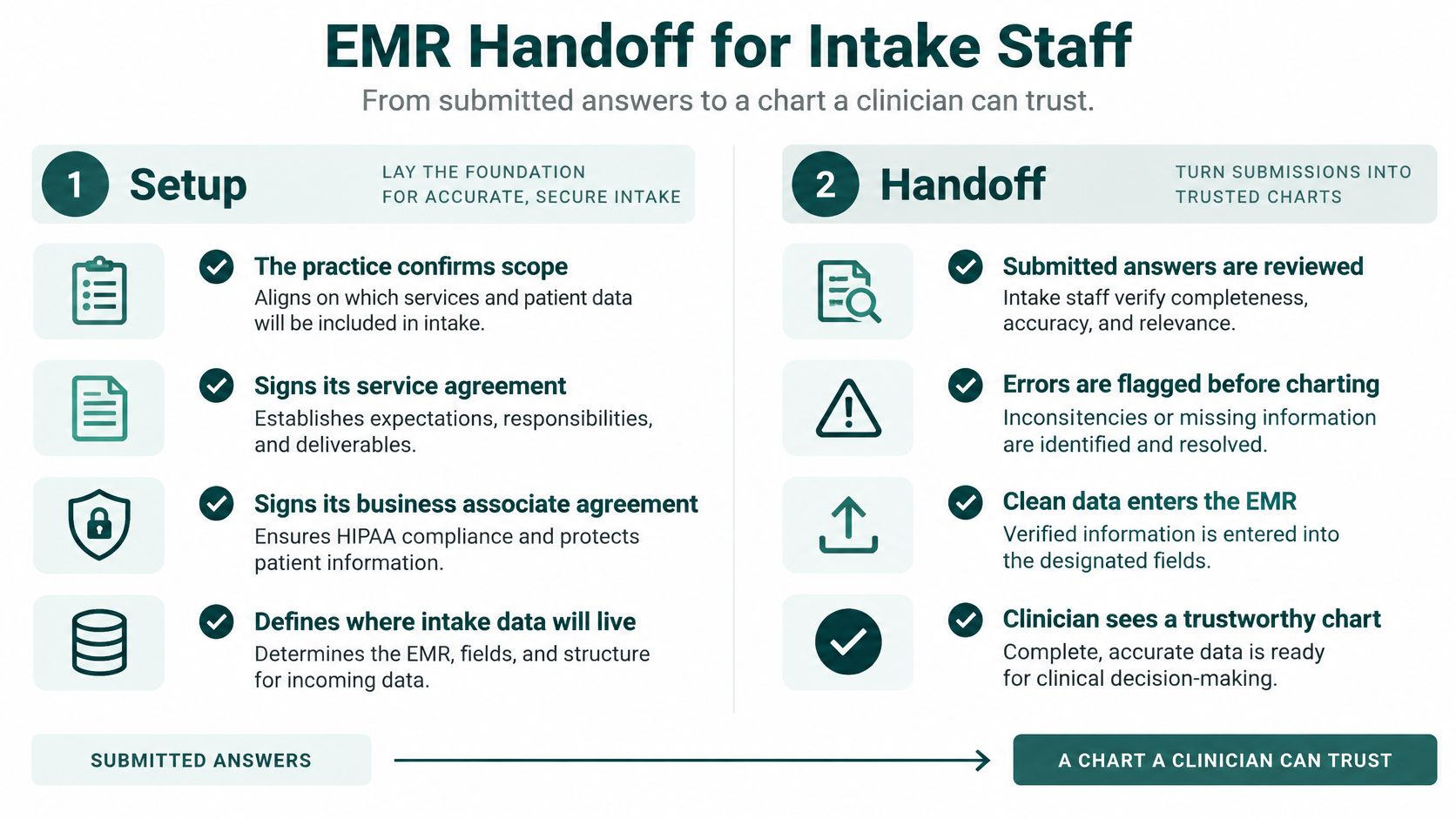
A submitted packet becomes useful when staff route each answer to its proper place and preserve what still needs review. Uploading a scan under miscellaneous documents may retain the paperwork, but it doesn't give registration staff a usable coverage field or the clinician a clearly queued medication discrepancy.
Set up access before assigning patient work
Our setup sequence starts by confirming scope and specialty requirements, then signing the service agreement and BAA. The practice approves the workstation and remote-access setup before role-specific accounts are created and written procedures shared. Initial work is reviewed and the workflow adjusted with the assistant.
The onboarding plan should cover identity verification, records requests, sensitive communications, and suspected security incidents. Give the assistant named escalation contacts and approved scripts, not a general instruction to use judgment. The practice approves the software, access levels, and patient-facing workflows.
Design access around the task: schedulers need appointment and contact information; insurance staff need coverage information; detailed behavioral-health narratives belong with the clinical team. Treat this as deliberate access design, not a reason to give every remote worker the full chart.
Route answers without erasing their origin
For systems using HL7 FHIR, the Structured Data Capture implementation guide describes a Questionnaire for the form definition and a QuestionnaireResponse for the completed submission. Smaller practices can apply the underlying discipline without building an integration: stable question identifiers, explicit answer types, required flags, and documented destinations.
- Registration: Route demographics and coverage into their structured fields.
- Clinical review: Queue medications, allergies, and history without presenting unreconciled answers as clinician-verified.
- Source retention: Preserve the original response where supported, with identifiable corrections.
- Conflict handling: Keep imported values visible and prevent them from overwriting patient corrections.
An intake coordinator can send forms, remind patients, prepare authorized records requests, and queue missing items. They can't diagnose, use a screening score to make an independent clinical decision, or change care because a release was declined.
Under the HHS Privacy Rule summary, covered entities generally can't condition treatment, payment, enrollment, or benefits eligibility on authorization, subject to limited exceptions. Build that distinction into missing-signature alerts so an administrative completeness rule doesn't become an inappropriate barrier to care.
Hiring a Remote Intake Coordinator
Evaluate candidates against the work they'll perform. Medical front-desk, registration, or insurance-verification experience is more relevant than a broad administrative title. Familiarity with EHR scheduling and patient messaging matters, but safe handling of uncertainty matters more than fast typing.
A remote medical receptionist role may overlap with intake, although a candidate who handles calls well may still need coaching on subscriber relationships or chart preparation.
Use a realistic work sample
Give candidates a fictional packet, never live patient records. Include a transposed date of birth, a subscriber recorded as the patient, and a medication entry with an unknown dose. Score whether they notice discrepancies, preserve the patient's wording, and escalate rather than guessing.
| Evaluation area | Evidence to look for |
|---|---|
| Registration accuracy | Distinguishes patient, subscriber, and guarantor |
| EHR discipline | Uses the correct field and documents unresolved items |
| Script adherence | Handles a declined release without pressure |
| Clinical boundaries | Routes symptoms and uncertain history to clinical staff |
| Language fit | Communicates accurately in the languages the role requires |
| Escalation judgment | Identifies the issue and sends it to the right owner |
Test communication and boundaries together
Use a scripted call where a patient declines a records release. A strong candidate continues the permitted registration steps and identifies the appropriate escalation, rather than promising consequences or arguing. When the patient describes symptoms, the candidate should follow the clinical-routing protocol, not interpret them.
If Spanish support is relevant, test spoken and written language using realistic appointment and registration phrases. Bilingual ability isn't a substitute for qualified interpreting of clinical or legal content.
Interview before hiring and finish confidentiality, training, and role-limited access arrangements before patient work. Expect tradeoffs: a careful script follower may need escalation coaching, while an effective bilingual caller may need more insurance training. Choose the gaps your supervisor can realistically support.
Specialty Changes and Related Forms
The useful specialty change is usually a focused block, not a second complete packet. Keep shared registration fields consistent and add only questions that change preparation, review, or the service delivered.
Match the clinical block to the service
Primary care and internal medicine need broad condition, surgery, medication, and allergy detail, together with only the screening instruments clinicians have adopted. Don't let administrative staff remove an answer because it seems unrelated to the appointment reason.
Behavioral health needs tighter separation between scheduling information and clinical narrative. Keep session details out of receptionist views, and have counsel confirm additional rules for sensitive records rather than adapting a general release without review.
Dental and orthodontic practices can focus history questions on conditions, medications, allergies, and devices relevant to procedures. They still need reliable guarantor information, particularly when the person attending isn't responsible for the account.
Physical therapy and optometry often need a focused functional or vision complaint and a referring provider. Naming that provider doesn't itself establish that outside records must be requested. Med spas should keep procedure-specific risk discussions and permissions distinct from generic new-patient registration.
Match administration to practice size
Multi-site groups need a shared field dictionary so locations don't store the same answer under incompatible labels. Solo practices can keep a simpler hybrid process, provided someone owns transcription, review, and unresolved questions. Larger groups should invest in role-specific access and routing rather than distributing the entire packet to every department.
Related workflows need their own boundaries:
- Insurance verification: Uses coverage entries to check eligibility before the visit.
- Prior authorization: Tracks payer permission for a service; it isn't a substitute for intake.
- Records requests: Use the appropriate disclosure basis and authorization when needed, not a privacy-notice acknowledgment.
- Procedure consent: Addresses the specific intervention rather than repeating general registration questions.
Add a specialty block, not another clipboard asking for the same name, coverage, and signatures.
The Takeaway
A patient intake form works when every answer has a destination, an authorized reviewer, and a backup route if the patient can't finish online. Separate identity, coverage, clinical history, notices, and any records release. Don't let a submitted packet stand in for human review or a general signature stand in for every disclosure decision.
Before changing staffing, identify the work that needs an owner: missing-field follow-up, reminders, coverage clarification, records tracking, and escalation. Those are manageable administrative tasks when your procedures define what staff can resolve and what must reach the clinical or compliance team.
Check before go-live
- Required fields: Mark genuine dependencies and allow honest unknown answers.
- Optional releases: Separate disclosure permissions from routine registration.
- Preferred language: Capture it early enough to affect the instructions.
- Error messages: Name the field and explain how to correct it.
- Partial completion: Enable save-and-return where supported and assign follow-up.
- Insurance mapping: Keep card details tied to the correct patient and subscriber.
- Clinical review: Queue allergies and medications for the appropriate clinician.
- Escalation ownership: Give staff a written contact and a defined response path.
Test the packet using a fictional patient with incomplete coverage information, an uncertain medication dose, and difficulty logging in. Confirm privacy duties with counsel or a qualified compliance professional before go-live, and ensure the person supervising intake can inspect unresolved work rather than relying on a completion badge.
MedicalVirtual offers pre-vetted Latin American healthcare staff for patient intake coordination, including onboarding, forms, records requests, and reminder calls using your approved scripts and systems. Visit MedicalVirtual to discuss an administrative intake role and bilingual English–Spanish support when it fits your patient panel.